Table of Contents
- How Much Is a Slow Website Costing You?
- How Do You Measure Website Speed?
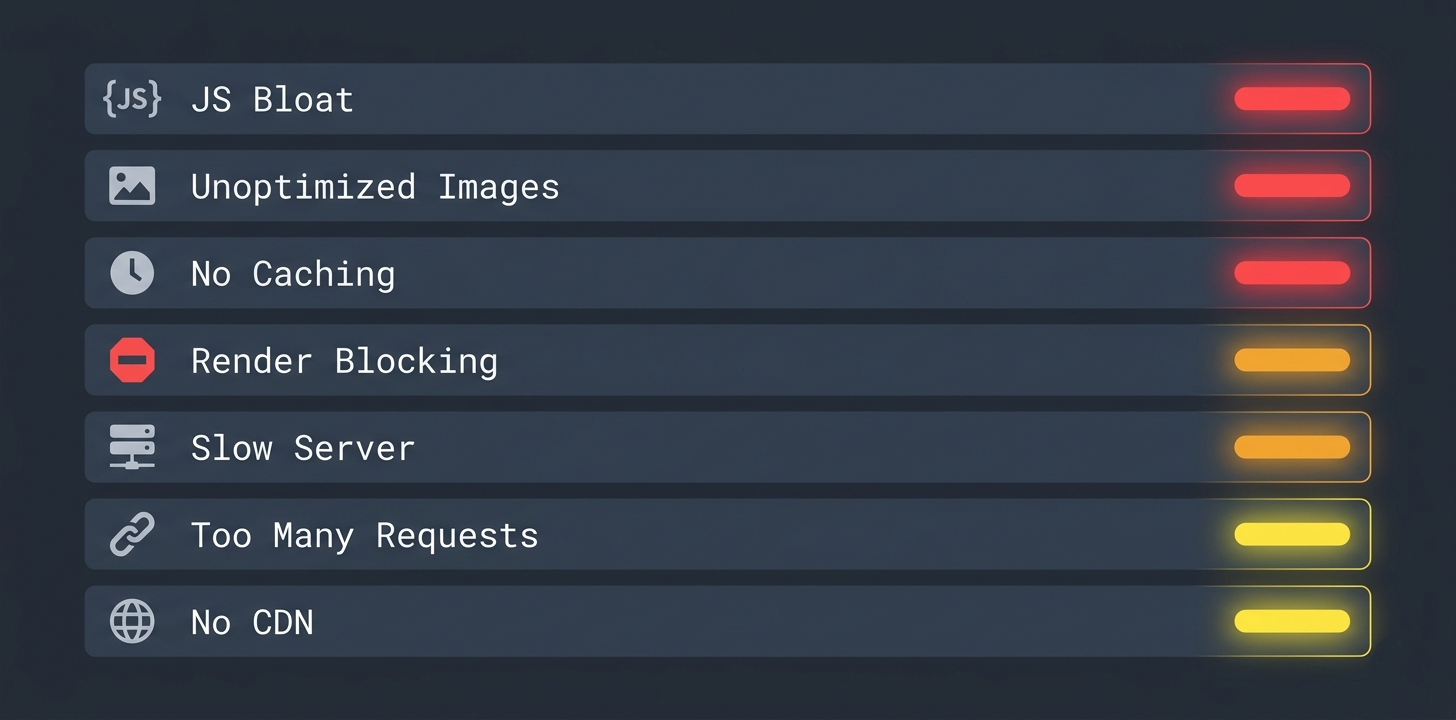
- What Are the 7 Reasons Your Website Is Slow?
- How Do You Fix a Slow Website?
- What Should Your Performance Targets Be?
- When Should You Rebuild Instead of Optimize?
- Frequently Asked Questions
How Much Is a Slow Website Costing You?
This is not a theoretical problem. The data is clear:
| Load Time | Bounce Rate Increase | Revenue Impact |
|---|---|---|
| 1–3 seconds | +32% | Baseline |
| 1–5 seconds | +90% | Significant loss |
| 1–6 seconds | +106% | Over half your visitors leave |
| 1–10 seconds | +123% | Nearly every visitor leaves |
Source: Google/SOASTA Research, 2026
Every additional second of load time costs you customers. Not hypothetically — measurably. If your website takes 5 seconds to load, you are losing roughly half of every visitor who clicks on your link in Google.
And it compounds. Google uses page speed as a direct ranking factor. A slow website ranks lower, which means fewer visitors, which means fewer conversions. A fast website ranks higher, gets more traffic, and converts more of it.
This is not a design problem. It is an engineering problem with engineering solutions.
How Do You Measure Website Speed?
Before fixing anything, you need to know exactly where you stand. Use these free tools:
| Tool | URL | What It Measures |
|---|---|---|
| Google PageSpeed Insights | pagespeed.web.dev | Core Web Vitals + recommendations |
| GTmetrix | gtmetrix.com | Load time waterfall + bottleneck analysis |
| WebPageTest | webpagetest.org | Real browser testing from multiple locations |
| Chrome DevTools | Built into Chrome | Network waterfall + JavaScript profiling |
Run your website through PageSpeed Insights first. Google gives you three scores that directly impact your search rankings:
| Metric | What It Measures | Target |
|---|---|---|
| LCP (Largest Contentful Paint) | How fast your main content appears | Under 2.5 seconds |
| FID (First Input Delay) | How fast the page responds to first click | Under 100ms |
| CLS (Cumulative Layout Shift) | How much the layout jumps while loading | Under 0.1 |
These three metrics are called Core Web Vitals — and Google uses them directly in ranking calculations. A perfect score does not guarantee page 1, but a failing score guarantees you will not get there.
What Are the 7 Reasons Your Website Is Slow?
1. Too Much JavaScript
This is the number one performance killer on the modern web.
Every JavaScript file your page loads must be:
- Downloaded over the network
- Parsed by the browser’s JS engine
- Compiled into executable code
- Executed before anything interactive happens
A typical WordPress site with 5 plugins loads 500KB–2MB of JavaScript. A React application with common dependencies ships 150KB+ before your application code.
The fix: Audit every script on your page. Ask: “Does the user need this on first load?” If the answer is no, defer it or remove it.
2. Unoptimized Images
Images are typically the heaviest assets on any webpage. A single unoptimized hero image can be 3–5MB — more than all other page resources combined.
| Format | Best For | Typical Size (1200px wide) |
|---|---|---|
| PNG | Screenshots, graphics with transparency | 500KB–2MB |
| JPEG | Photographs | 200KB–800KB |
| WebP | Everything (modern replacement) | 50KB–200KB |
| AVIF | Everything (next-gen replacement) | 30KB–150KB |
The fix: Convert all images to WebP or AVIF. Serve responsive sizes using srcset. Lazy-load images below the fold.
3. No Caching Strategy
Without caching, every page visit downloads every resource from scratch. Your server processes the same database queries, renders the same HTML, and sends the same files — for every single visitor.
The fix: Implement three layers of caching:
- Browser caching — static assets cached locally for repeat visits
- CDN caching — content served from edge servers close to the user
- Database caching — query results cached in memory to avoid repeated database hits
4. Render-Blocking Resources
CSS and JavaScript files in your “ block the browser from rendering anything until they finish downloading and processing. If you have 8 CSS files and 5 JavaScript files loading synchronously, the user sees a blank white screen until all 13 files complete.
The fix: Inline critical CSS. Defer non-essential JavaScript. Load fonts asynchronously with font-display: swap.
5. Slow Server Response Time
Before the browser can render anything, it must receive HTML from your server. If your server takes 2 seconds to respond, your page cannot possibly load in under 2 seconds — everything else stacks on top.
| Server Type | Typical Response Time |
|---|---|
| Shared hosting | 500ms–3 seconds |
| VPS | 100ms–500ms |
| Cloud (AWS/GCP/Azure) | 50ms–200ms |
| Edge/CDN (Cloudflare/Vercel) | 10ms–50ms |
| Static files (pre-built) | 5ms–20ms |
The fix: If your server response exceeds 200ms, you either need better hosting or a different architecture. Static site generators like Astro eliminate server response time entirely by pre-building pages at deploy time.
6. Too Many HTTP Requests
Every resource on your page — images, scripts, stylesheets, fonts, analytics trackers — requires a separate HTTP request. Each request adds network latency.
A typical bloated website makes 80–120 HTTP requests per page load. A well-optimized site makes 15–25.
The fix: Bundle CSS and JavaScript files. Use CSS sprites or inline SVGs for icons. Remove unused analytics and tracking scripts. Every request you eliminate saves 50–200ms.
7. No Content Delivery Network (CDN)
Without a CDN, every visitor downloads your website from a single server location. If your server is in the US and your visitor is in Ghana, every request travels across the Atlantic Ocean and back.
The fix: Put your site behind a CDN. Services like Cloudflare (free tier available) cache your content on servers worldwide. A visitor in Accra loads from an African edge server, not a US data center. A visitor in Dubai loads from a Middle Eastern server. Response time drops from 500ms to 20ms.
How Do You Fix a Slow Website?
Understanding the problems is half the battle. Here is the prioritized fix list — ordered by impact:
Priority 1: Quick Wins (Under 1 Hour)
These fixes require no code changes and deliver immediate results:
| Fix | Time | Expected Impact |
|---|---|---|
| Enable CDN (Cloudflare free tier) | 15 min | -200ms to -500ms globally |
| Compress images to WebP | 30 min | -50% to -80% page weight |
| Enable browser caching headers | 10 min | Instant repeat-visit speed |
| Remove unused analytics/tracking scripts | 10 min | -2 to -5 HTTP requests |
Priority 2: Code-Level Fixes (1–4 Hours)
These require access to your codebase:
| Fix | Time | Expected Impact |
|---|---|---|
| Defer non-critical JavaScript | 1 hour | -500ms to -2 seconds |
| Inline critical CSS | 1 hour | Eliminates render-blocking |
| Lazy-load below-fold images | 30 min | -30% to -60% initial page weight |
| Implement responsive image srcset | 1 hour | Mobile loads only mobile-sized images |
Priority 3: Architectural Fixes (1–2 Days)
These require significant engineering work but deliver the biggest long-term gains:
| Fix | Time | Expected Impact |
|---|---|---|
| Migrate to static site generation | 1–2 days | Eliminates server response time entirely |
| Implement database query caching | 1 day | -80% server processing time |
| Bundle and minify all assets | 2 hours | -40% to -60% total requests |
| Move to edge deployment (Vercel/Netlify) | 2 hours | Sub-50ms server response worldwide |
The Compound Effect
Each fix alone might save 200–500ms. But performance fixes compound. Implementing all Priority 1 and 2 fixes typically transforms a 6-second site into a 2-second site. Adding Priority 3 pushes it under 1 second.
| Stage | Typical Load Time |
|---|---|
| Before any optimization | 4–8 seconds |
| After Priority 1 (quick wins) | 2–4 seconds |
| After Priority 2 (code fixes) | 1.5–2.5 seconds |
| After Priority 3 (architecture) | Under 1 second |
The difference between a 6-second site and a sub-1-second site is not just user experience — it is the difference between page 3 of Google and page 1.
What Should Your Performance Targets Be?
Not every website needs to load in 500ms. Your targets depend on your business model:
| Business Type | LCP Target | Why |
|---|---|---|
| E-commerce | Under 1.5 seconds | Every 100ms delay costs 1% in conversions |
| SaaS dashboard | Under 2 seconds | Users access daily — speed builds habit |
| Content/blog | Under 2.5 seconds | Google ranks fast content sites higher |
| Portfolio/agency | Under 1.5 seconds | Speed IS the proof of your expertise |
| Real estate | Under 2 seconds | Buyers browse on mobile in emerging markets |
If you sell web development services and your own website is slow, you have already lost the client. Your website performance is your first portfolio piece.
This is why FoudaTech is built with Astro — a framework that ships zero JavaScript by default. Every page on this website loads in under 1 second because the architecture eliminates the performance problems described in this article at the foundation level.
When Should You Rebuild Instead of Optimize?
Sometimes optimization is not enough. Here are the signs that your website needs a ground-up rebuild, not patches:
Optimize When:
- Your site loads in 3–5 seconds and you have not tried basic fixes yet
- The codebase is clean but assets are unoptimized
- Server response is slow but the code itself is sound
- You have a specific bottleneck (images, one heavy script) that can be isolated
Rebuild When:
- Your site loads in 6+ seconds despite optimization attempts
- The codebase is built on a page builder (Elementor, Divi, Wix) with no access to underlying code
- You have 15+ WordPress plugins and removing any one breaks functionality
- Your server response exceeds 2 seconds due to architectural limitations
- Your Core Web Vitals scores are red across all three metrics
| Scenario | Cost of Optimization | Cost of Rebuild | Better Investment |
|---|---|---|---|
| Clean code, unoptimized assets | Low | Unnecessary | Optimize |
| Page builder, moderate bloat | Medium | Medium | Depends on goals |
| Plugin-heavy CMS, slow hosting | High (temporary fix) | Medium | Rebuild |
| Legacy framework, technical debt | Very high (diminishing returns) | Medium-high | Rebuild |
The key question: Will optimization deliver sub-2-second load times? If the answer is no due to architectural limitations, optimization money is wasted. A rebuild on modern architecture delivers permanent performance at a comparable cost.
Frequently Asked Questions
How do I check my website speed right now?
Go to pagespeed.web.dev and enter your URL. Google will test your page and give you scores for Largest Contentful Paint (LCP), First Input Delay (FID), and Cumulative Layout Shift (CLS). These are the three metrics Google uses directly in search ranking calculations. Test both mobile and desktop — mobile scores are what Google uses for ranking.
Does website speed really affect SEO rankings?
Yes — directly. Google confirmed Core Web Vitals as a ranking signal in 2021 and has increased their weight since. Two pages with identical content and backlinks will rank differently based on speed. The faster page wins. Beyond the direct ranking signal, slow pages have higher bounce rates — which is an indirect negative signal Google measures.
My website looks fast to me. Could it still be slow?
Absolutely. You likely have a fast internet connection and your browser has cached your site’s assets from previous visits. Your visitors are experiencing the uncached first visit — which is always slower. Always test performance using PageSpeed Insights or GTmetrix with cache cleared, and test on mobile throttled connections.
Is WordPress always slow?
No. A properly engineered WordPress site with a custom theme, minimal plugins, server-side caching, and a CDN can load in under 2 seconds. The problem is that most WordPress sites are built with page builders, 15+ plugins, shared hosting, and no performance optimization. It is not WordPress that is slow — it is the way most people use WordPress.
How much does it cost to fix a slow website?
It depends on whether you need optimization or a rebuild. Basic optimization (image compression, caching, CDN setup) can be done for minimal cost. Code-level fixes require developer time. A full architectural rebuild varies based on complexity. The most cost-effective approach is a technical audit first — identify exactly what is causing the slowdown before spending money on fixes.
Will a faster hosting plan fix my speed problems?
Sometimes, but usually no. If your server response time is the bottleneck (over 500ms), better hosting helps. But if your site loads 2MB of JavaScript and 5MB of unoptimized images, faster hosting just delivers the bloat faster. Fix the code first, then upgrade hosting if server response is still slow.
What is the fastest website architecture available?
Static site generators like Astro that pre-build pages at deploy time and serve them from edge CDNs. There is no server processing, no database queries, no runtime JavaScript compilation. The page is a pre-built HTML file served from a server physically close to the visitor. Response times are typically 5–20ms — which is as fast as the internet allows.