 Omar Fouda
Someone looking for a new dentist usually has a few quick questions. Can I book online? Do you take my insurance? Are you open on Saturday? Can you see me today if it hurts? If your website answers them in seconds, they book. If they have to dig, they go back to the search results and try the next clinic.
Open your clinic’s website on your phone as you read, and pretend you’ve never heard of the clinic. There’s a scorecard at the end.
If you’d rather see the fixes than make a list, I’ll build a free preview of your clinic’s new homepage within 2 business days, before you pay anything. Clinic websites start from CA$3,500 for up to five pages. For an example, see Brightwater Lane Dental, a concept clinic I built as a demo. It isn’t a real practice. In a Lighthouse mobile test on November 29, 2026, it scored 100/100 for accessibility and 96/100 for performance. Get your free homepage preview.
Table of Contents
- Can Patients Book or Call in One Tap?
- Are Your Hours, Location and Parking Easy to Find?
- Do You Explain Insurance and Direct Billing?
- What Should Your Website Say About the Canadian Dental Care Plan?
- Is Your Emergency Information Clear?
- Do Your Service and Team Pages Answer Patients’ Questions?
- Does Your Website Work for Every Patient?
- How Fast Does Your Website Load on a Phone?
- Are Your Forms Safe for Patient Privacy?
- Your Dental Website Scorecard
- See Your New Homepage Before You Pay
- Frequently Asked Questions
Can Patients Book or Call in One Tap?
New patients want to know how to get an appointment. Check these on your phone:
- A Book button at the top of every page. It should open your real online booking if your practice software offers it, or a short request form if not, rather than a general contact page.
- A phone number that dials when tapped, in the header, not only in the footer. Many patients still prefer to call.
- Buttons that stay within reach. On a phone, a small Call and Book bar at the bottom of the screen means nobody has to scroll back up.
- A clear “accepting new patients” line near the top, if you are.
- What happens at the first visit: how long it takes, what to bring, and whether forms can be filled in before arriving.
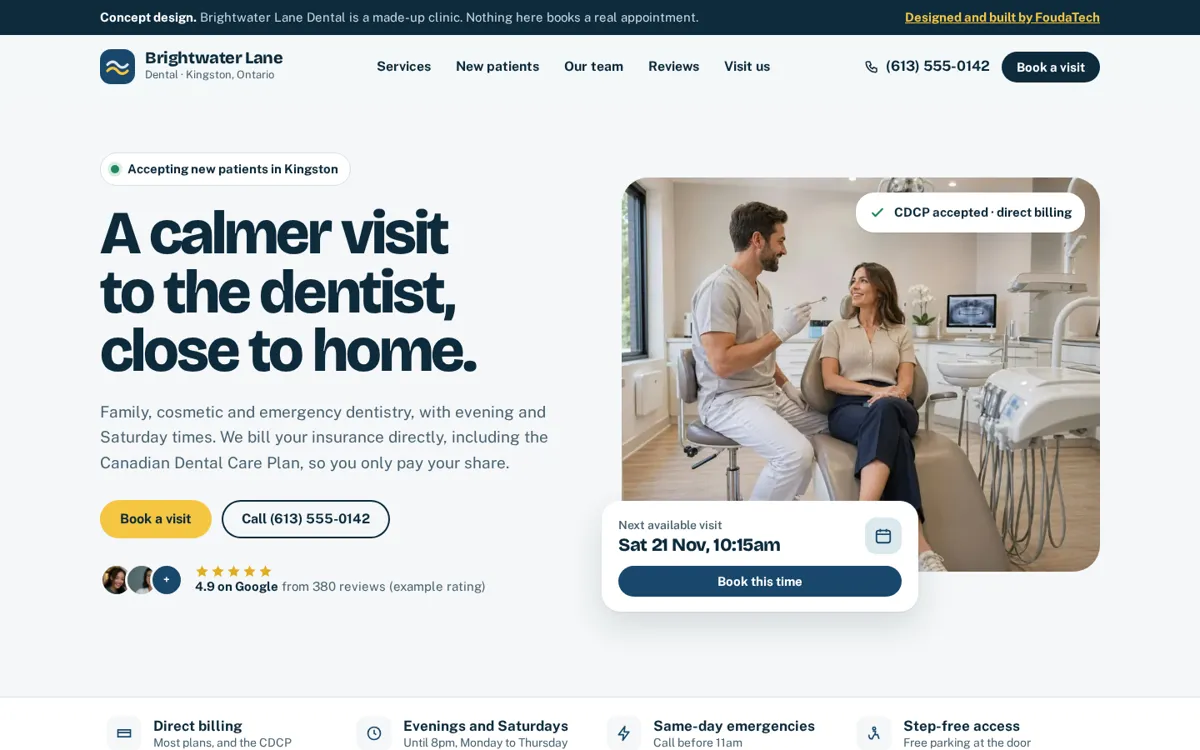 Brightwater Lane Dental, a concept dental clinic homepage FoudaTech built as a demo. It isn’t a real practice. Its star rating is a made-up example, which a real Ontario clinic should check against the RCDSO’s advertising rules. New-patient status, booking, insurance, hours, emergencies and access all show before the patient scrolls.
Are Your Hours, Location and Parking Easy to Find?
Answer these before they become phone calls:
- Hours for each day, in a list, not a paragraph. If you have evening or Saturday hours, show them off.
- Holiday hours, updated before each long weekend.
- The same details everywhere. Your hours, address and phone number should match your Google Business Profile exactly.
- The address with a map link that opens directions on the patient’s phone.
- Parking and transit: free lot, paid parking, the nearest bus or subway stop.
- Access details: a step-free entrance, an elevator, accessible parking, and which floor or suite. A patient using a wheelchair needs to know before leaving home.
Do You Explain Insurance and Direct Billing?
Patients want to know what they’ll pay. Answer it on the homepage or one tap away:
- Do you direct bill? Say whether you send claims to the patient’s insurer, so they pay only their share at the visit.
- Which plans? If there are plans you can’t bill directly, say which.
- What patients pay on the day.
- Payment options, such as payment plans or financing, if you offer them.
- Estimates. If you give a written estimate before treatment, say so.
What Should Your Website Say About the Canadian Dental Care Plan?
The Canadian Dental Care Plan (CDCP) is the federal plan that helps pay for dental care for eligible residents. To qualify, a person must have no access to private dental insurance, an adjusted family net income under $90,000, a tax return filed in Canada and Canadian residency for tax purposes, according to Canada.ca. When I checked on November 29, 2026, applications were open for the 2026-2027 benefit period.
For clinics, participation is voluntary. You can sign up formally through Sun Life, which processes CDCP claims, or submit claims on a claim-by-claim basis. Either way, you bill Sun Life directly, and Canada.ca says CDCP clients “should not be asked to pay the full cost upfront”.
Patients are told to check with you first. Canada.ca’s advice to CDCP members is to confirm, before booking, that the provider will accept them as a CDCP patient and bill Sun Life directly, and to ask what costs the plan won’t cover. It also notes that not all participating providers are listed in Sun Life’s search tool, so your website is often where a CDCP patient looks for the answer.
What to put on your site:
- A plain yes or no. If you accept CDCP patients and bill Sun Life directly, say so on the homepage and your insurance page. If you don’t, saying so saves your front desk the calls.
- What patients may still pay. CDCP fees are set separately from provincial fee guides, so a patient may have a co-payment, an additional charge, or both. Canada.ca reminds members that the plan “does not mean that all care is free”, so don’t word your page as if it does.
- Official banners, if you want them. The government’s CDCP toolkit offers web banners and buttons that, in its words, “can be added to your professional website”.
Is Your Emergency Information Clear?
A patient in pain isn’t browsing. They want to know, at a glance, whether you can see them today.
- What your clinic treats as an emergency, such as a severe toothache, swelling, or a broken or knocked-out tooth.
- Your same-day policy, for example “Call before 11 a.m. and we’ll try to see you today.”
- A tap-to-call number right beside it, not a form.
- After-hours instructions: who to call when you’re closed, and when to go to a hospital emergency department instead. Your dentists should write or approve this part.
In Ontario, the RCDSO has rules on how a clinic may describe emergency care, so read my guide to its advertising rules before you call anything an emergency service.
Do Your Service and Team Pages Answer Patients’ Questions?
Services. Give each main service its own page or section, in the words patients use: cleanings, fillings, children’s dentistry, implants, clear aligners, root canals. Say what happens, how long it takes, who it’s for and who provides it. These pages also help you show up in local searches.
Team. Show real photos of your dentists and hygienists, with names, roles and a sentence or two about each.
Languages. List the languages your team speaks. If your clinic does business in Quebec, French on your website isn’t optional: the Government of Quebec lists websites among the things businesses must make available in French (official page, in French).
Credentials, reviews and before-and-after photos. Dental regulators set advertising rules, and they can cover how you describe qualifications as well as testimonials and photos. In Ontario, read my guide to RCDSO advertising rules for dental websites before you add them. Elsewhere, check your own regulator’s rules.
Does Your Website Work for Every Patient?
Some patients have low vision, and some can’t use a mouse. Try this:
- Put the mouse away and press Tab through your homepage and booking form. Can you reach every button, and always see where you are?
- Zoom to 200%. Does the page still work, or does text overlap?
- Check contrast. WCAG 2.0 Level AA asks for a contrast ratio of at least 4.5 to 1 for normal text, so pale grey on white won’t do.
- Check your images. Do photos and image buttons have text descriptions a screen reader can read?
In Ontario, businesses and non-profits with 50 or more employees must make their public websites meet WCAG 2.0 Level AA, according to Ontario’s guidance. If your clinic is smaller, that rule doesn’t apply, but the same basics help every patient. My guide to AODA website requirements has more ways to check.
How Fast Does Your Website Load on a Phone?
A slow page makes patients wait before they see your Book button, and some won’t wait.
Open PageSpeed Insights, enter your homepage and look at the mobile results. Google’s Core Web Vitals guidance treats a page as good when its largest content appears within 2.5 seconds, it responds to taps within 200 milliseconds, and its layout shift score is 0.1 or less.
For comparison, my concept clinic homepage scored 96/100 for performance in a Lighthouse 12.6 mobile test on November 29, 2026, with its largest content in 2.2 seconds and no layout shift. My guide to why websites are slow explains the fixes.
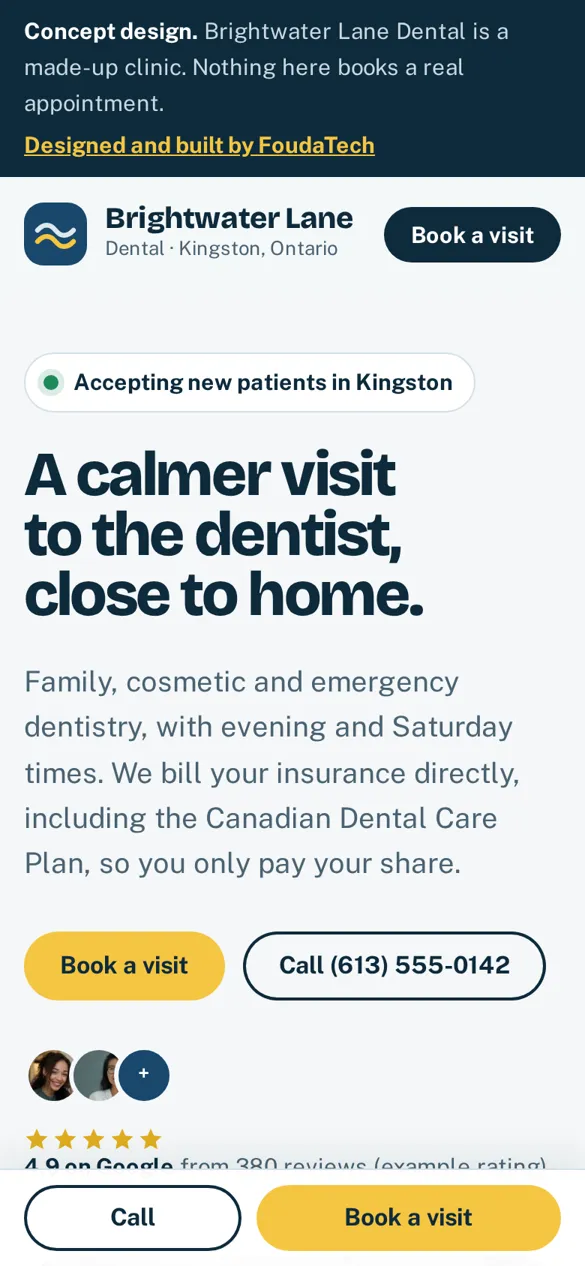 The same concept dental clinic homepage FoudaTech built as a demo, on a phone. The whole page weighs 207 KB, and the Call and Book a visit bar stays at the bottom of the screen as the patient scrolls.
Are Your Forms Safe for Patient Privacy?
A website form isn’t the place for medical history. Check every form on your site:
- Ask only for what the front desk needs to reply: name, phone, email and a preferred time. The Office of the Privacy Commissioner of Canada tells businesses to collect only the personal information they need for an identified purpose.
- No symptoms or health history. Those can wait for the phone call or the visit.
- A line telling patients to call for anything urgent, so nobody describes a swollen face in a form that’s read the next morning.
- A privacy policy linked from every form, HTTPS on every page, and a cookie notice if you use analytics. My Canadian website compliance checklist covers the basics.
Some provinces have their own health privacy laws, such as the Personal Health Information Protection Act (PHIPA) in Ontario. Have your clinic’s privacy officer review your forms and privacy policy before launch.
Your Dental Website Scorecard
Score each line on your phone: 2 if your site does it well, 1 if it partly does, 0 if it doesn’t.
| # | Check | Score 2 if the site has… | Score |
|---|---|---|---|
| 1 | Booking | A Book button at the top of every page, linked to your booking tool or a short form | |
| 2 | Calling | A tap-to-call number on every page | |
| 3 | New patients | Whether you’re accepting new patients, and what the first visit involves | |
| 4 | Hours | Hours for each day and holidays, matching your Google Business Profile | |
| 5 | Location | Address, map link, parking, transit and entrance details | |
| 6 | Insurance | Whether you direct bill, and what patients pay at the visit | |
| 7 | CDCP | Whether you accept CDCP patients and bill Sun Life directly | |
| 8 | Emergencies | What counts, your same-day policy and after-hours steps | |
| 9 | Services | A page or section for each main service | |
| 10 | Team | Real photos, names and roles | |
| 11 | Languages | The languages your team speaks, and French pages if you do business in Quebec | |
| 12 | Accessibility | Keyboard access, text readable at 200% zoom, strong contrast | |
| 13 | Phone speed | Largest content within 2.5 seconds in PageSpeed Insights’ mobile test | |
| 14 | Safe forms | Forms that ask only for contact details and a preferred time | |
| 15 | Privacy | A privacy policy linked from every form, and HTTPS | |
| Total | Out of 30 |
My rule of thumb, not an official standard: 26 to 30 means your site is doing its job. From 18 to 25, patients are probably getting stuck somewhere. Under 18, a new homepage may be quicker than patching the old one. Whatever your score, fix what stops a booking first: booking and calling (1 and 2), then hours, insurance and the CDCP (4, 6 and 7), then phone speed (13).
See Your New Homepage Before You Pay
If your score showed more gaps than you’d like, send me your clinic’s current website. Within 2 business days, I’ll send back a free preview of your new homepage, using your clinic’s name, services and photos. It costs nothing, and you owe nothing if you don’t like it.
If you go ahead, clinic websites start from CA$3,500 for up to five pages, with a fixed written quote before any work starts. More service pages, a second location or a fully bilingual site cost more. You pay 50% to start, 30% once you’ve tested it and 20% at launch, and the finished site is yours. I work remotely from Accra, Ghana, during Canadian business hours, by email or video call.
Get your free homepage preview. Planning the budget first? Read how much a dental website costs in Canada.
Frequently Asked Questions
What should a dental website include?
A Book button and a tap-to-call number on every page, whether you’re accepting new patients, hours, location and parking, insurance and direct billing, your CDCP status, emergency information, a page for each main service, your team, and forms that don’t ask for health details.
Should my dental website mention the Canadian Dental Care Plan?
If you see CDCP patients, yes. Canada.ca tells CDCP members to confirm before booking that a provider will accept them and bill Sun Life directly, so a clear line on your site answers that. Mention that some patients may still have a co-payment or additional charges.
Is it safe to collect patient information on a dental website?
Collect as little as you can: name, phone, email and a preferred time, not symptoms or health history. In Ontario, personal health information is covered by PHIPA, so have your privacy officer review your forms and privacy policy.
Can I put patient reviews on my dental website?
That depends on your regulator’s advertising rules, which can cover reviews, testimonials and before-and-after photos. In Ontario, read my guide to RCDSO advertising rules for dental websites first.
How fast should a dental website load on a phone?
Google’s guidance treats a page as good when its largest content appears within 2.5 seconds. Test your homepage in PageSpeed Insights’ mobile view, and fix the slowest pages first.