 Omar Fouda
If you run a dental clinic in Ontario, the Royal College of Dental Surgeons of Ontario (RCDSO) has rules about what your website can say. Common trouble spots are a star rating on the homepage, a “state of the art” claim, or a service page that never says whether the dentist is a general dentist or a specialist.
I build clinic websites, so here’s a plain summary of the College’s current documents, with links, and how I build a site around them. Clinic websites start from CA$3,500, and you can see a free preview of your clinic’s new homepage within 2 business days, before you pay anything. To judge my work, open Brightwater Lane Dental, a concept clinic site I built that scored 100/100 for accessibility in Lighthouse’s mobile test. Further down, I show what I’d change in its wording for Ontario.
Table of Contents
- Does the RCDSO Treat Your Website as Advertising?
- What Can’t an Ontario Dental Website Say?
- Can You Show Testimonials and Google Reviews?
- Are Before-and-After Photos Allowed?
- Can You Say You’re the Best or “State of the Art”?
- Who Can Use the Word “Specialist”?
- Can You Advertise Prices, Discounts or Free Offers?
- What Credentials Can Your Website List?
- What Else Do the Rules Cover?
- How I Build Clinic Websites Around These Rules
- Frequently Asked Questions
This is general information, not legal advice, and I’m a web developer, not a lawyer. I checked every source on November 29, 2026. Check with the RCDSO before you rely on it: its Practice Advisory Service is at practiceadvisory@rcdso.org.
Does the RCDSO Treat Your Website as Advertising?
Yes. The College’s practice advisory on professional advertising (November 2012) covers any material about your practice that’s published, displayed or used, by you or by someone on your behalf, and it lists websites by name. Its social media advisory is blunt: “Websites are a form of professional advertisement.”
Two things follow:
- You’re responsible for what your web designer writes. The College’s article The dos and don’ts of advertising (July 28, 2025) says dentists are responsible for all advertisements involving them and their clinics. It suggests sharing the advisory with anyone who makes your ads.
- The core rules are law. Paragraphs 60 and 61 of section 2 of O. Reg. 853/93, the professional misconduct regulation under the Dentistry Act, 1991, make certain kinds of advertising professional misconduct. The College’s Advertising Guidelines page summarizes them.
What Can’t an Ontario Dental Website Say?
In short:
| Topic | What the rules say | Source |
|---|---|---|
| Testimonials | No testimonials, or statements only verifiable by personal feelings | Advisory, reg. para. 60 |
| Being better | No superiority, uniqueness or comparisons; no “state of the art” or “cutting edge” | Advisory, reg. para. 60 |
| Results and fears | Nothing likely to create expectations of favourable results or appeal to fears | Reg. para. 60 |
| Accuracy | Nothing false, misleading, ambiguous or only partly disclosed | Reg. para. 60 |
| Treatments | Say whether you’re a general practitioner or a specialist | Reg. para. 61 |
| Fees | Allowed if clearly stated; taken as the maximum, for every patient | Advisory |
| Incentives | No giveaways, contests, draws or free products or services | Advisory |
| Credentials | Only degrees required for registration; no continuing education or memberships | Advisory |
Can You Show Testimonials and Google Reviews?
Testimonials are on the College’s list of things not to include: “testimonials or any statement that can only be verified by a person’s personal feelings or views.”
The College’s documents don’t mention Google reviews by name. My reading, as a web developer: a review quoted on your homepage, or a review feed embedded on the site, puts a patient’s opinion into your advertising, which is what the testimonial rule is about. So on an Ontario clinic site, I leave out review widgets, patient quotes and star ratings unless the College has told you a format is fine.
Reviews raise a privacy issue too. The College’s page on online interactions describes a dentist who answered a negative review by posting the patient’s photos. The patient had only agreed to their photos being used on the dentist’s website. Reply to reviews without patient details, and take the conversation offline.
Are Before-and-After Photos Allowed?
The College’s advertising documents don’t mention before-and-after photos by name. Two other sources apply.
First, its advice on the use of patient images (Winter 2024) says a patient’s image is personal health information and needs the same consent and confidentiality safeguards as the rest of the record. (Ontario’s health privacy law is PHIPA.) Its steps include:
- Explain every way the images might be used, especially online.
- Get consent in advance, then re-confirm it in writing after the patient has seen and approved the images, even if they don’t identify the patient.
- Record the consent in the patient’s file, with the date and signature.
- Remove the images from every use if the patient withdraws consent.
Second, the advertising regulation still applies. A gallery that suggests every patient will get the same result could be read as creating “expectations of favourable results.”
If you want a gallery, I build it with a plain caption of what was done, no identifying details, and photos that are easy to remove. Ask the College about your gallery before it goes live.
Can You Say You’re the Best or “State of the Art”?
No. The advisory rules out “statements which are indicative of superiority or uniqueness” and superlative or comparative terms such as “state of the art” and “cutting edge”. The regulation adds comparisons with another practice. The 2025 article lists more examples: “#1 rated”, “hires only top graduates”, “best at”, and promises like risk-free care or guaranteed results.
Swap the adjective for a fact a patient can check. These examples are mine, not the College’s, and must be true for your clinic:
| Instead of | Try a fact like |
|---|---|
| The best family dentist in town | Family dentistry for all ages, with evening and Saturday hours |
| State-of-the-art technology | Digital X-rays and 3D scans |
| Pain-free, guaranteed results | We explain each step, and your options, before treatment starts |
| The city’s #1 rated clinic | Accepting new patients |
Facts also answer what patients ask before they book; see my dental website checklist.
Who Can Use the Word “Specialist”?
Only a dentist with a specialty certificate. Section 8 of the regulation bars titles that indicate specialization, or claims to be a specialist or specially qualified, without one. The College’s article on titles (September 26, 2023) lists the 11 recognized specialties, from dental anaesthesia and endodontics to orthodontics, paediatric dentistry and periodontics.
The same article says a dentist may not be described as a “cosmetic dentist”, “implant specialist” or “holistic dentist”. A general dentist may limit their practice to one area, such as orthodontics, but must clearly say they’re a general practitioner.
Paragraph 61 goes further. Any advertisement that refers to an area of practice, a procedure or a treatment must say whether the dentist is a general practitioner or a specialist, and in which specialty. That touches almost every service page, so a page about implants should say who provides them, for example “Our dentists are general dentists.”
Can You Advertise Prices, Discounts or Free Offers?
Prices, yes. The advisory says “there is nothing to prevent you from advertising a fee”, with conditions: the fee must be clearly stated, and unless you say otherwise it’s taken as the maximum fee, including laboratory costs, for every patient, whether or not they saw the ad and whether or not they have insurance.
Promotions are harder. The advisory rules out “incentive programs, including giveaways, contests, draws or free products or services”, and the 2025 article adds “reduced rates, bonuses, or tiered programs”. The College’s conflict of interest guideline (March 2018) bars promoting a practice with gifts, contests, prizes, rebates or credits, though it allows a reduced or free service, such as whitening, for groups like new patients or seniors, if it isn’t a reward for referrals. So ask the College before a “new patient special” goes on your homepage.
The advisory also warns against advertising deals that pay a third party based on how much business a campaign brings in. If a marketer wants to be paid per new patient, check with the College first. It’s one reason I charge a fixed price for a website, never a share of the patients it brings in.
What Credentials Can Your Website List?
Fewer than many dentist bios do. The advisory rules out references to continuing education, to membership or positions in the College or in societies, associations or academies, and to degrees other than the ones required for your registration.
Paragraph 41 of the regulation lists the designations you may use: “dentist”, “dental surgeon”, a prescribed specialty designation, certain earned degrees, “dental centre”, “dental clinic” and “and associates”. A clinic using the last three must tell the College the names and certificate numbers of the dentists practising there.
A bio that fits might give the dentist’s name, “general dentist” or their specialty, their qualifying degree, their services and the languages they speak. I’d treat an association logo in the footer as a reference to membership too.
What Else Do the Rules Cover?
- Your name. Paragraph 40 makes it misconduct to offer dental services under a name other than your registered name or practice name. The practice names advisory says a practice name shouldn’t describe the practice, equipment or expected results. Use your exact registered name on the site.
- “Emergency” wording. Paragraph 46 limits “dental emergency service”, or any designation indicating emergency care, to a service with a dentist present at least 16 hours every day and available for the other 8, or one sponsored by an Ontario Dental Association component society. Paragraph 18 requires dentists to arrange emergency care for their patients or tell them how to get it, so a page explaining what to do is useful. Ask the College before calling the clinic an emergency service.
- Treatment claims. Paragraphs 12 and 13 bar misrepresenting a treatment, or claims with no generally accepted scientific or empirical basis.
- A draft standard. A 2026 draft standard on managing new patient requests would also require practice information to meet accessibility law, naming the AODA. It isn’t in force yet; see my guide to AODA website requirements.
How I Build Clinic Websites Around These Rules
The College has the final say; my job is to make its rules easy to follow:
- Your registration category on every service page, and in each dentist’s bio.
- No reviews, ratings or testimonials by default. Each section can be added or left out without a rebuild, if the College says a format is fine.
- Fees written as the maximum, for every patient, or no fees at all.
- Forms that ask only for contact details and a preferred time, not health history. My Canadian website compliance checklist covers privacy.
- Accessibility to WCAG 2.0 Level AA, the standard Ontario uses.
- You approve every word before launch, because the College holds you responsible for it.
Brightwater Lane Dental shows my approach to layout and speed. It’s a made-up clinic, and its sample text wasn’t written to the RCDSO’s rules, which makes it a useful example. For an Ontario clinic, I’d change:
- the headline, “A calmer visit to the dentist”, a comparison only feelings can verify
- the example star rating and patient quotes
- “Family, cosmetic and emergency dentistry” and a team title of “family and cosmetic dentist”, which don’t say general dentist or specialist and use a title the College rules out
- “Same-day emergencies”, which I’d check against the emergency rule
What stays: “Accepting new patients”, direct billing, the hours, step-free access, and the Book and Call buttons.
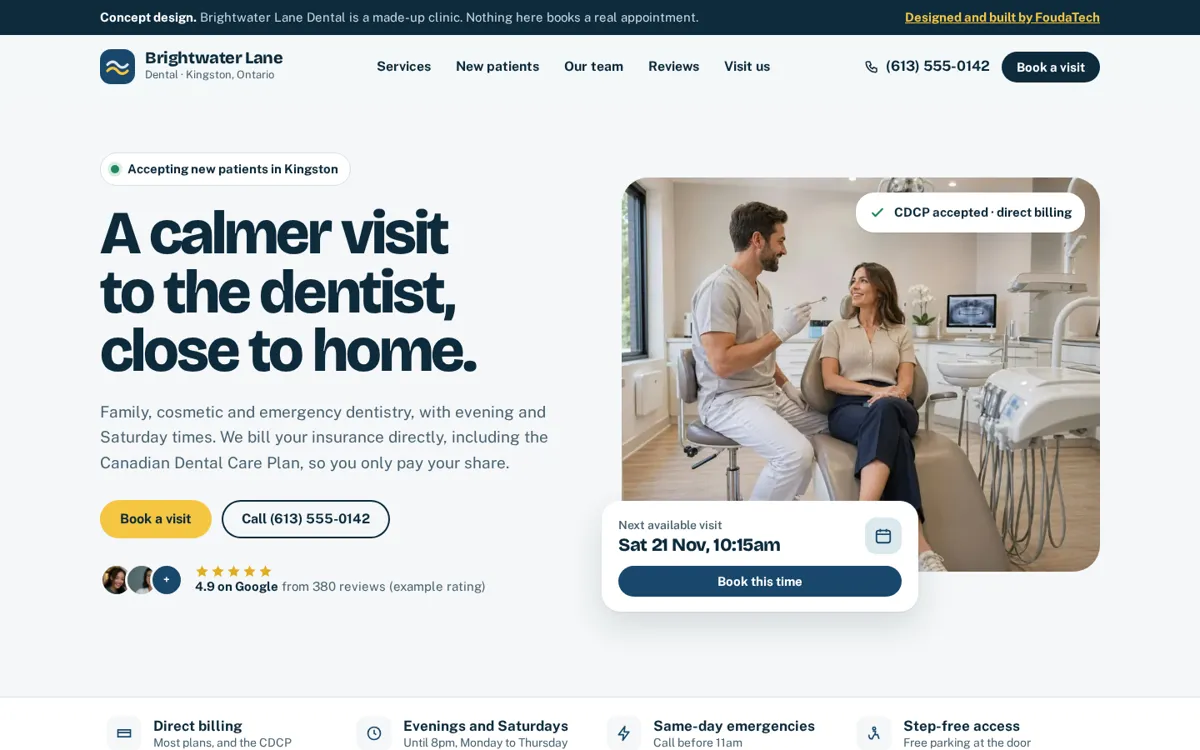 A concept dental clinic homepage FoudaTech built as a demo. Brightwater Lane Dental isn’t a real business. For an Ontario clinic, I’d change its headline, its example rating and “cosmetic and emergency dentistry”.
Clinic websites start from CA$3,500 for up to five pages, fixed in writing before work starts; see what a dental website costs in Canada. Send me your current website and you’ll get a free preview of your clinic’s new homepage within 2 business days, before you pay anything.
Related guides: Dental website checklist · AODA website requirements · How much a website costs in Canada
Frequently Asked Questions
Does the RCDSO allow testimonials on a dental website?
No. Its advertising advisory lists testimonials, and any statement only verifiable by personal feelings or views, among the things not to include. Google reviews aren’t named, so ask the College before showing any on your site.
Can Ontario dentists post before-and-after photos?
The advertising documents don’t name them. The College treats patient images as personal health information: get consent in advance, re-confirm it in writing after the patient approves the images, and remove them if consent is withdrawn. They also mustn’t create expectations of favourable results.
Can a general dentist call themselves a cosmetic dentist?
No. The College’s article on titles gives “cosmetic dentist”, “implant specialist” and “holistic dentist” as descriptions a dentist may not use. A general dentist can list their services, but must say they’re a general practitioner.
Can a dental website show prices?
Yes. The fee must be clearly stated, and unless you say otherwise it’s taken as the maximum fee, including laboratory costs, for every patient, insured or not.
Who is responsible if my web designer breaks the rules?
You are. The College says dentists are responsible for all advertisements involving them and their clinics, including material made on their behalf. Share the advisory with your designer and approve every page.
Is this legal advice?
No. It’s a web developer’s summary of the RCDSO’s published documents, checked on November 29, 2026. For a definite answer, contact the College at practiceadvisory@rcdso.org, or get legal advice.