 Omar Fouda
Table of Contents
- How to use this interactive floor plan software checklist
- Running it day to day: availability and prices
- How buyers see it: phones, your website and links
- Inquiries, floor plans and your data
- Contract, support and ownership
- Interactive floor plan software comparison sheet
- How to get one
- Frequently Asked Questions
How to use this interactive floor plan software checklist
Choosing interactive floor plan software is mostly about what happens after launch. Most interactive floor plan demos look good. The differences between vendors show up after launch: who keeps the data current, what changes cost, and what you are left with if the relationship ends.
This list is about sales tools that put the floor plans you already have on a clickable building for buyers, not about software for drawing floor plans.
Use these twelve questions on every vendor you are considering. For each one we explain why it matters and how FoudaTech handles it. Where we do not publish a fixed policy, we say so, and you should ask us directly, the same way you would ask anyone else.
If you are still deciding what kind of tool you need, start with what an interactive tower map is or the tower map vs floor plan comparison.
Selling homes or lots in a community rather than condos? Use the site plan software checklist for home builders and see a live 931-home community map.
Running it day to day: availability and prices
1. Who updates availability, and how fast does it show?
Why it matters: Availability is the reason buyers trust the map. If a unit shows Available after it has been reserved, a buyer inquires, gets told it is gone, and stops believing the rest of the map. The question is not only whether status can change, but who changes it and how long the buyer waits to see it.
How FoudaTech handles it: Your team updates status (Available, Reserved or Sold) and prices in a management dashboard, with no developer involved. Buyers see the change immediately. We cover why this matters in real-time unit availability.
2. Can you hide prices per unit?
Why it matters: Many developers show prices on some units and not others. Penthouses, corner plots or units under negotiation are often “on request”. A tool that only lets you show all prices or none forces you into a choice you do not want to make.
How FoudaTech handles it: Today you show prices or hide them across the whole map, and hidden prices are left out of the page entirely, not just covered up. A per-unit “on request” option is in development. Buyers still see status, size and details, and can inquire.
How buyers see it: phones, your website and links
3. How does it behave on a phone?
Why it matters: A lot of property browsing happens on phones, often on slower connections, and remote buyers may never see your site on a desktop. Hover effects do nothing on a touchscreen, and small shapes on a large render can be hard to tap.
Test the vendor’s live demo on your own phone: can you tap a single unit accurately, read the panel, and reach the inquiry button?
How FoudaTech handles it: The unit shapes are SVG overlays that scale with the image, so they stay aligned on any screen size. Hover becomes tap on mobile. The map is a lightweight overlay on a 2D image, not a heavy 3D model. You can try it yourself on the live demo.
4. Does it embed on your existing website?
Why it matters: Your website probably already exists and works. A tool that needs a new site, a specific platform, or a developer to install it adds cost and delay.
How FoudaTech handles it: It embeds with one script tag on WordPress, Webflow or a custom site. No rebuild or migration. We can place the snippet for you and check it renders correctly. The steps are in how to add an interactive floor plan to your website.
5. Can you share it as a link?
Why it matters: Not every buyer arrives through your website. Your agents send listings over WhatsApp and email, and brokers pass details on to their own clients. Being able to send the map itself, rather than a PDF, keeps everyone looking at current availability.
How FoudaTech handles it: Yes. As well as embedding on your site, the map works as a shareable link.
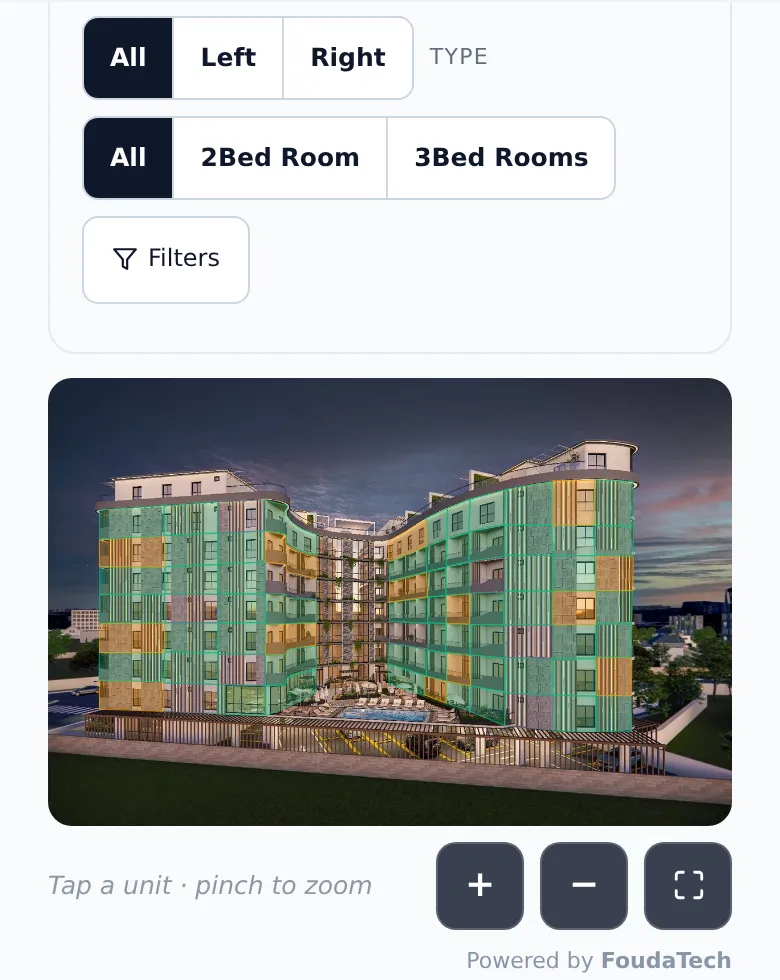 The same map on a phone, with filters by floor, wing and unit type.
Inquiries, floor plans and your data
6. Where do inquiries go?
Why it matters: An inquiry that lands in an inbox nobody checks is a lost sale. You also want to know which unit the buyer was looking at, so your team can reply with something specific instead of “thanks for your interest”.
How FoudaTech handles it: Each unit has a one-tap inquiry, with a form and direct call or WhatsApp options. Inquiries are delivered to you and name the specific unit. If you need inquiries split between several agents or offices, raise it with us during setup so we can confirm what fits your team.
7. Can each unit type have its own floor plan?
Why it matters: Buyers choosing between a 2-bed and a 3-bed want to see the layout before they ask. If every unit links to the same brochure, the map has not answered their question.
How FoudaTech handles it: Each unit can show a floor plan and a photo gallery. Per-unit galleries and view tags are included from the Growth tier upwards.
8. Can you load your data from a spreadsheet?
Why it matters: Your unit list already lives somewhere, usually a spreadsheet. Retyping hundreds of rows by hand is slow and introduces mistakes in prices and sizes.
How FoudaTech handles it: At setup, a simple spreadsheet with pricing, area, bedrooms, bathrooms, view orientation and gallery images is all we need. We load it for you. For ongoing changes, your team edits units in the dashboard. If you expect to make large bulk changes after launch, such as repricing a whole phase, ask us how that would work for your project.
Contract, support and ownership
9. What happens to the map if you cancel?
Why it matters: Interactive floor plan tools are usually hosted by the vendor and paid for on a recurring basis. That is what keeps them live and editable. It also means you should know, before you sign, what happens if you stop paying: whether the map goes offline, whether you get your data back, and in what form.
Ask every vendor, including us, to put the answer in writing.
How FoudaTech handles it: The map is a hosted service, with a setup fee plus an annual subscription that covers hosting, the dashboard, updates, support and edits. We do not publish a cancellation policy on our site, so ask us directly and we will confirm the terms in your agreement.
10. What support is included, and are edits limited?
Why it matters: Prices move and phases release. If each change outside a status toggle is billed as new work, the real cost of the tool can be well above the quote. Support matters too. If something breaks the week before a launch event, you need to know who answers and how.
How FoudaTech handles it: Support and unlimited edits are included in the subscription on every tier, and Growth adds priority support. You deal directly with the engineer who built your map, with no project managers relaying messages in between.
11. How long does delivery take?
Why it matters: Maps are often wanted for a launch, a sales event or a new phase release. A vendor that cannot commit to a timeline puts that date at risk.
How FoudaTech handles it: The map system is already built and running, so your map can be live in 2–3 days once we have your render, unit list, floor plans and photos. Larger projects take longer, and we’ll tell you up front. A free demo of your own building is usually ready within a few days, so you can see it before committing.
12. Who owns your data and images?
Why it matters: Your renders, floor plans, photos and unit data are your marketing assets. You will use them in brochures, on portals and in future campaigns. You should know whether the vendor claims any rights over them, and whether you can get your unit data back in a usable format.
How FoudaTech handles it: We build on the renders and images you already have. We do not publish a policy on data ownership or export on our site, so ask us and we will confirm it in your agreement. Ask the same of any vendor.
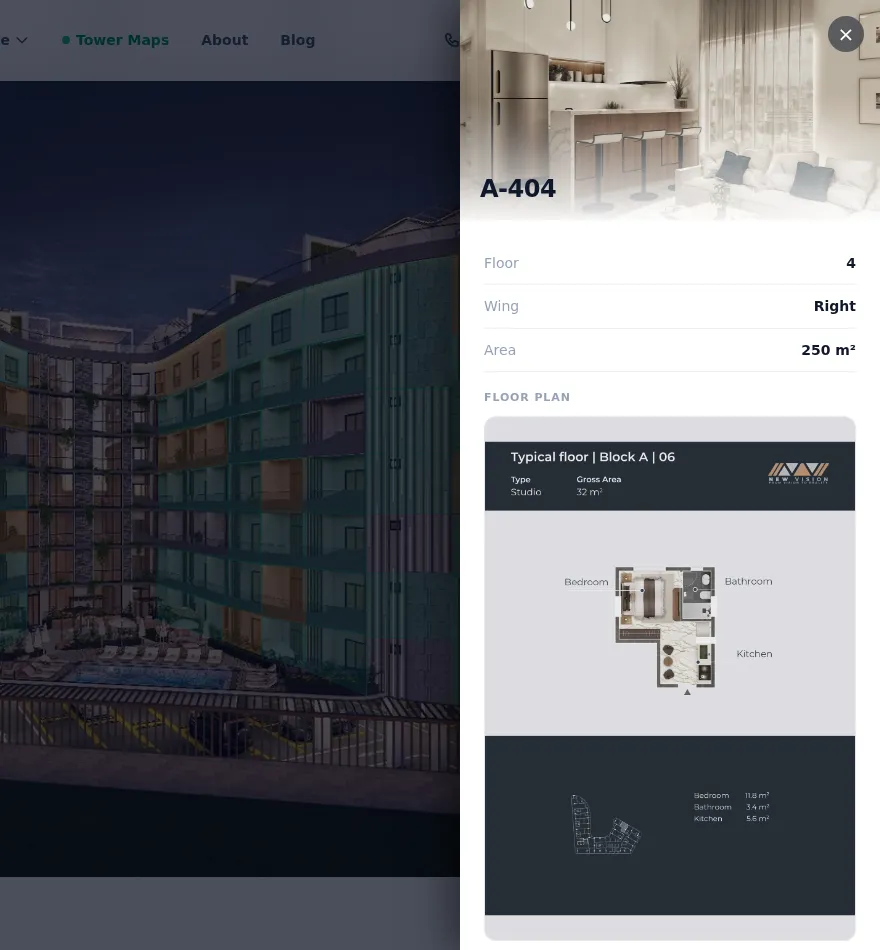 Tapping a unit opens its details and floor plan.
Interactive floor plan software comparison sheet
Copy this table and fill in a column for each vendor.
| Question | What a good answer looks like |
|---|---|
| Who updates availability? | Your own team, in a dashboard, visible straight away |
| Hide prices per unit? | Across the whole map today; per unit in development |
| Mobile | Accurate tapping, readable panels, on your own phone |
| Embedding | One snippet, works on your current platform |
| Shareable link | Yes |
| Inquiries | One tap, names the unit, reaches the right person |
| Floor plans | Per unit or per unit type |
| Data import | Spreadsheet accepted at setup |
| If you cancel | Stated clearly in writing |
| Support and edits | Included, with no per-change fees |
| Delivery | A committed timeline |
| Data and images | Yours, stated in writing |
How to get one
FoudaTech builds each map for you on your own render, then hands your team a dashboard to run it.
- Send your render (elevation, aerial, site plan or masterplan) or request a free demo.
- Send your unit data in a spreadsheet.
- We map every unit and build the map and dashboard.
- Embed it with one script tag, or share it as a link.
Pricing (USD): Starter from $1,200 setup + $600/year; Growth $2,000 setup + $900/year; Premium from $5,000 setup + $2,000/year. The subscription covers hosting, the dashboard, updates, support and edits. For what drives the price within each tier, see how much an interactive tower map costs.
Mapping a community of homes or lots from a site plan or masterplan instead? That starts from $2,000 setup + $600/year; see what an interactive site plan costs.
The map system is already built and running, so your map can be live in 2–3 days once we have your render, unit list, floor plans and photos. Larger projects take longer, and we’ll tell you up front.
See a live interactive tower map → or request a free demo.
Frequently Asked Questions
What is the most important question to ask a floor plan software vendor?
Who updates availability and how quickly buyers see it. If status is wrong, buyers stop trusting the map. Your own team should be able to change it from a dashboard, with the change visible straight away.
Can I hide prices on some units but not others?
With FoudaTech, not yet: today prices are shown or hidden across the whole map, while buyers still see status and details. A per-unit “on request” option is in development.
Do I need to rebuild my website?
No. The map embeds with one script tag on WordPress, Webflow or a custom site, and also works as a shareable link.
Are edits included?
Yes. Unlimited edits and support are included in the annual subscription on every tier, so marking units sold or changing prices costs nothing extra.
How long does it take to go live?
The map system is already built and running, so your map can be live in 2–3 days once we have your render, unit list, floor plans and photos. Larger projects take longer, and we’ll tell you up front.