 Omar Fouda
Table of Contents
- The short answer
- What drives the cost
- Setup fee vs annual subscription
- Interactive tower map pricing tiers
- What is not worth paying for
- Hidden costs to ask every vendor about
- How to compare quotes fairly
- How to get one
- Frequently Asked Questions
The short answer
The cost of an interactive tower map usually comes in two parts: a setup fee to build the map for your development, and a recurring fee to keep it hosted, editable and supported while you sell. At FoudaTech that means a setup fee from $1,200 plus an annual subscription from $600 (USD) for one condo tower of up to about 80 units, rising with the size and complexity of the project.
Pricing a community of houses rather than a tower? Community maps start at US$2,000 setup + US$600/year: see interactive site plan cost, the live Alton map (931 homes, live nine days after the first email), or request a free demo.
If you have two or three quotes on your desk that look nothing alike, that is normal. Vendors bundle different things into each part, and some leave out costs that only show up after launch. This guide explains what actually moves the price, what each part of the fee should cover, and the questions that make quotes comparable. Want your own number first? Send your render and unit count and we’ll build a free demo of your tower and quote it in writing.
What drives the cost
Most of the work in a tower map is not the software. It is mapping your building accurately and loading your data correctly. These are the factors that change how much of that work there is.
Number of units, plots or lots
Every unit is a shape traced onto your render and a record in the dashboard. A 40-unit mid-rise and a 900-lot community are very different jobs, which is why a community of homes is priced on its own (from $2,000 setup + $600/year), not on the tower tiers below. More units means more mapping, more data to check, and more care with filters so buyers can narrow a long list quickly.
Number of views, towers and phases
One elevation of one tower is the simplest case. Each extra view adds work: a second facade, a separate tower, a masterplan with phases, or a site plan that links through to individual buildings. A multi-tower masterplan needs navigation between buildings so buyers can move around the project without getting lost.
Whether the render already exists
A tower map is built on the image you already use in your brochure: a 2D elevation, an aerial photo, a site plan or a masterplan render. If you have one, there is nothing new to design. If you do not, you will need an architect, visualiser or photographer to produce one first, and that is a separate cost from the map itself. Ask any vendor whether their price assumes you supply the image.
Floor plans and galleries
Attaching a floor plan to each unit type is straightforward. Per-unit photo galleries and view tags take more time, because every image has to be matched to the right unit and prepared for the web. The more units have their own media, the more setup work there is.
Custom branding
Your colors and currency are standard. Removing the vendor’s branding entirely (white-label delivery) or building a custom workflow in the dashboard for your sales team is extra work and is usually priced into a higher tier. At FoudaTech, both are part of the Premium tier.
Setup fee vs annual subscription
The two parts pay for different things. Knowing which is which makes it easier to spot a quote that looks cheap now and costs more later.
| Setup fee (one-time) | Annual subscription | |
|---|---|---|
| What it pays for | Building your map | Keeping it live and current |
| Typical work | Tracing every unit, loading your data, branding, testing on phones and desktops | Hosting and uptime, the management dashboard, updates, support and edits |
| When you pay | Before launch | Each year the map is live |
| What changes it | Units, views, towers, galleries, branding | The tier you are on |
The subscription is what turns a map into a sales tool. Prices change, phases release and units sell. If every change means emailing a developer and waiting, the map goes out of date and buyers stop trusting it. A dashboard your own team controls, with edits included, is what keeps availability accurate in real time.
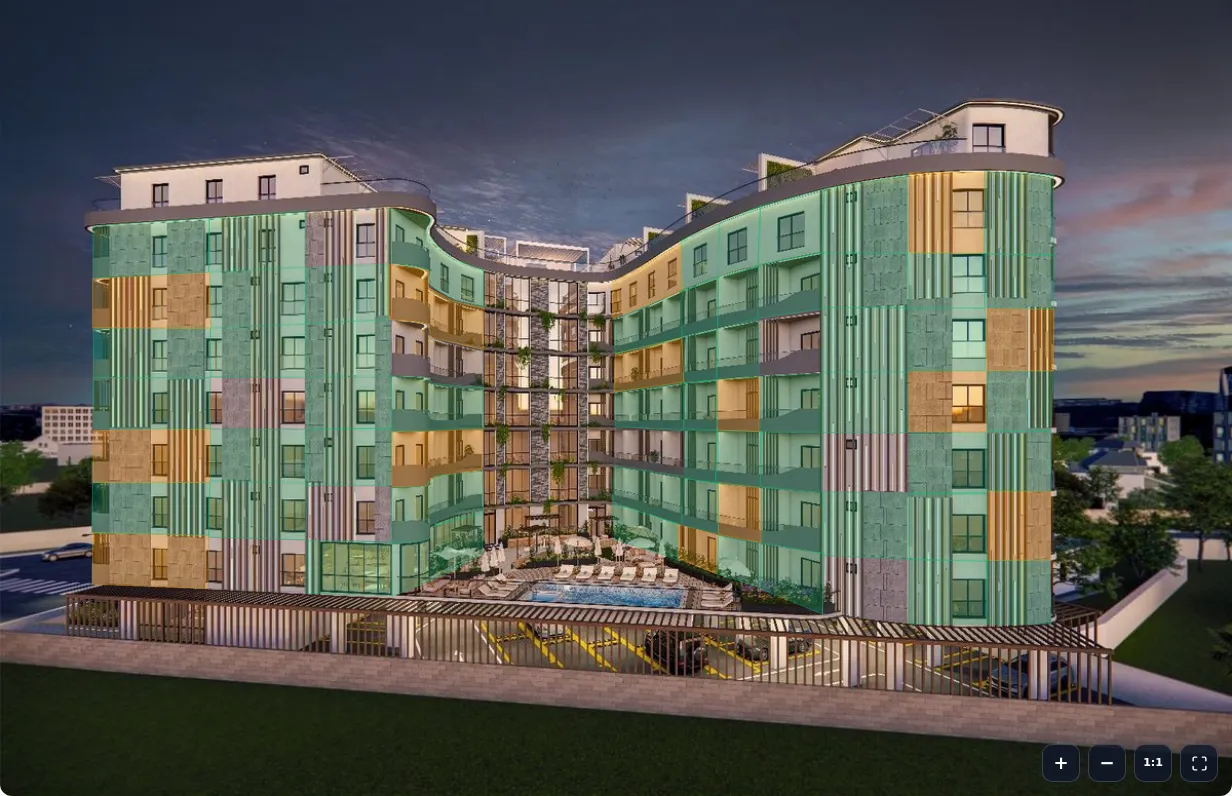 A live Tower Maps demo: each unit is a clickable shape colored by status.
Interactive tower map pricing tiers
These are the live prices on our Tower Maps page for condo and apartment towers. All prices are in USD.
| Starter | Growth | Premium | |
|---|---|---|---|
| Setup | From $1,200 | $2,000 | From $5,000 |
| Annual | $600/year | $900/year | $2,000/year |
| Best for | A single tower, up to about 80 units | Larger towers, up to about 150 units | Multi-tower, over 150 units, or premium markets |
| Includes | 1 interactive map, management dashboard, hosting, unit inquiries delivered to you, unlimited edits | Everything in Starter, plus per-unit galleries and view tags, and priority support | Multiple towers or phases, white-label delivery, custom dashboard workflow, dedicated onboarding |
On every tier the subscription covers hosting, the dashboard, updates, support and edits. Billing is annual, so there is no monthly invoice to manage.
Tiers are a starting point, not a box you must fit. A 60-unit tower with a gallery for every unit may sit between two tiers. We quote from your render and unit list.
A land subdivision or a community of homes is not priced on these tower tiers. Community maps start from $2,000 setup + $600/year for a small community, and larger communities are quoted after a free demo. See community maps and interactive site plan cost.
What is not worth paying for
Some line items look impressive in a proposal but do little for sales. Before you pay extra, ask whether it helps a buyer pick a unit and inquire.
- A brand-new render made only for the map. If your marketing render is clear enough to see each unit, it is clear enough to map.
- Heavy 3D walkthroughs as the main selection tool. They can look good in a showroom, but buyers on phones need to find an available unit and ask about it. We compare the options in interactive 2D vs 3D floor plans.
- A full website rebuild. A tower map should embed on the site you already have. If a vendor says you need a new site to use their map, that is a separate project with a separate price.
- Paying per change. Status changes are the whole point of the tool. They should be included, not billed one at a time.
- Features your team will not maintain. A field that nobody keeps updated ends up wrong, and wrong data on a sales tool is worse than no data.
Hidden costs to ask every vendor about
The quote is only part of the cost. These are the questions that bring the rest into the open. Ask them of every vendor, including us.
Hosting
Is hosting included, or do you need your own server or a separate plan? If the map is hosted by the vendor, is it included in the recurring fee, and what happens to the fee in year two?
Edits and content changes
How many edits are included? Is changing a price, swapping a floor plan or adding a phase treated as an edit, or as new work? Some vendors include status changes but charge for anything else.
Per-update fees
Ask directly: “If we sell ten units this week, does it cost us anything to mark them sold?” The answer should be no.
Who updates status
Does your sales team update availability from a dashboard, or do you send changes to the vendor and wait? Waiting means a buyer can see a unit as available after it has been reserved. That is the fastest way to lose trust in the tool.
Adding more later
What does it cost to add a second tower, a new phase or another view after launch? Developments grow. Get the price for expansion before you sign, not after.
Branding and white-label
Is the vendor’s logo on the map? Is removing it an extra fee?
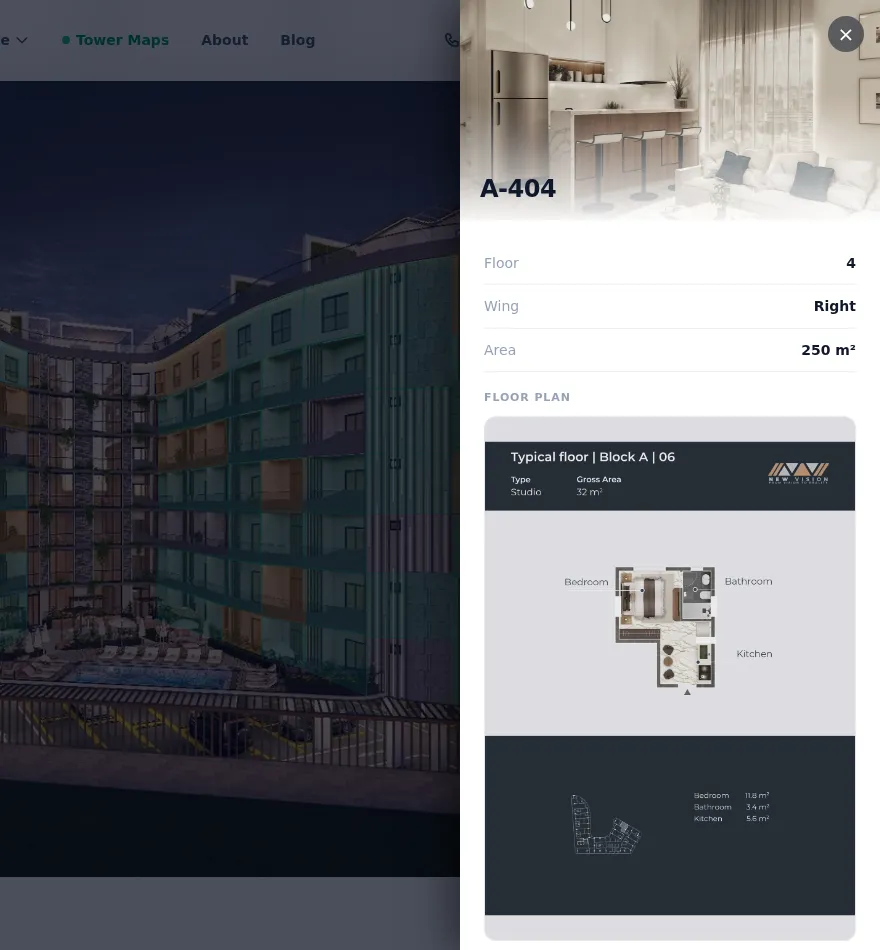 Tapping a unit opens its details and floor plan.
How to compare quotes fairly
To compare quotes properly, put them on the same basis:
- Add up three years. Setup plus three years of recurring fees, plus any per-edit or hosting costs you expect. A low setup fee with a high monthly charge can cost more over the life of a project.
- Check what each fee includes. Hosting, dashboard, support and edits should each be either included or priced.
- Confirm the scope. Number of units, views, towers, phases, and whether galleries are per unit or per type.
- Ask who does the work. Is the map built for you, or are you given software to map the building yourself?
- Ask what the vendor needs from you. A render and a spreadsheet of unit data, or more?
If two quotes still differ after this, the difference is usually scope. One vendor has priced more units, more views or more media than the other.
How to get one
FoudaTech builds each map for you on your own render. You do not configure a template yourself.
- Send your render and a rough unit count, or request a free demo of your building.
- Send your unit data. A simple spreadsheet with pricing, size, bedrooms, bathrooms, view and status is enough.
- We map every unit, build the dashboard and brand the map to your development.
- You embed it with one script tag on WordPress, Webflow or a custom site, or share it as a link.
Tower pricing (USD): Starter from $1,200 setup + $600/year; Growth $2,000 setup + $900/year; Premium from $5,000 setup + $2,000/year. The subscription covers hosting, the dashboard, updates, support and edits. A community of homes is priced separately, from $2,000 setup + $600/year.
The map system is already built and running, so your map can be live in 2–3 days once we have your render, unit list, floor plans and photos. Larger projects take longer, and we’ll tell you up front.
See a live interactive tower map → or request a free demo.
Related guides: interactive site plan cost for home communities, pre-construction condo sales, stacking plans for leasing.
Frequently Asked Questions
How much does an interactive tower map cost?
At FoudaTech, from $1,200 setup plus $600 a year for a single condo tower of up to about 80 units. Larger towers are $2,000 setup plus $900 a year, and multi-tower or larger projects start at $5,000 setup plus $2,000 a year (USD). A community of homes is priced separately, from $2,000 setup plus $600 a year; see interactive site plan cost.
Why is there an annual subscription?
The map has to stay live and accurate while you sell. The subscription covers hosting, the management dashboard, updates, support and edits, so your team can mark units sold and change prices without paying for each change.
Do I need a new render to get a tower map?
Usually not. The map is built on the elevation, aerial photo, site plan or masterplan render you already use in your marketing. If you do not have one yet, it has to be produced first, and that is separate from the map.
Does the price depend on the number of units?
Yes. The number of units, views, towers and phases is the main driver of setup cost, along with how many units have their own galleries and whether you need white-label delivery, which is part of the Premium tier.
Are there extra fees for editing the map?
Not on our plans. Edits are included in the subscription on every tier. When comparing other vendors, ask whether status changes, price changes and new phases are included or charged separately.
How long does it take?
The map system is already built and running, so your map can be live in 2–3 days once we have your render, unit list, floor plans and photos. Larger projects take longer, and we’ll tell you up front. A free demo of your own building is usually ready within a few days.