 Omar Fouda
Table of Contents
- What is an interactive resort map?
- Why location on the property matters
- What each room or villa can show
- Two-story buildings: one view per floor
- Use 1: marketing, groups and events
- Use 2: selling villas and units in a resort
- How status works on an interactive resort map
- Static property map vs interactive resort map
- What it is not
- How to get one
- See It Live: Alton, Florida
- Frequently Asked Questions
What is an interactive resort map?
An interactive resort map is the site plan or aerial photo of your property turned into a clickable map on your website, where every room, villa or cottage is a shape a guest or buyer can tap. It opens a panel with that room’s type, its view, how many it sleeps, the beds, photos and a floor plan, plus a one-tap inquiry that goes to your reservations or sales team.
It suits properties that spread out rather than up: a boutique beach hotel or motel on the Gulf Coast, villas around a pool near Orlando, cottages or bungalows in the Florida Keys, a glamping site, or a resort selling villas or condo-hotel units. Most already have a hotel property map: a drawing at the front desk, a PDF on the website, or an illustrated villa map in the brochure. It shows the layout, but it can’t tell anyone what room 14 is like.
Send us your property map and we’ll map one area as a free demo before you pay anything; small properties start from $2,000 setup + $600/year.
It’s the same map system that runs the live Alton map, 931 homes in Palm Beach Gardens, Florida. Builders and agents use it for homes and lots, as we cover in interactive community maps for real estate agents; here it’s applied to rooms and villas.
Why location on the property matters
On a low-rise property, the room type is only half the question. The other half is where it is. Guests and buyers ask things like:
- “Is it pool side or garden side?”
- “Which cottages face the water?”
- “Is there a quiet corner away from the restaurant?”
- “Can we park close to the room?”
- “Is it on the ground floor? My mother can’t do stairs.”
- “Can our group have rooms next to each other?”
A room-type page doesn’t answer those, and a static map shows nothing about each room. So the questions land on your front desk or sales manager.
An interactive resort map answers them on the picture itself. The pool, beach access, restaurant, spa and parking are on the map, and each room sits where it really is. A guest can see that the garden king is two doors from the pool and away from the parking lot without anyone writing it down.
What each room or villa can show
The base is the site plan, illustrated map or aerial photo you already have. We trace each room, villa or cottage as a clickable shape that stays aligned from a desktop down to a phone, and add amenity pins for the places guests ask about.
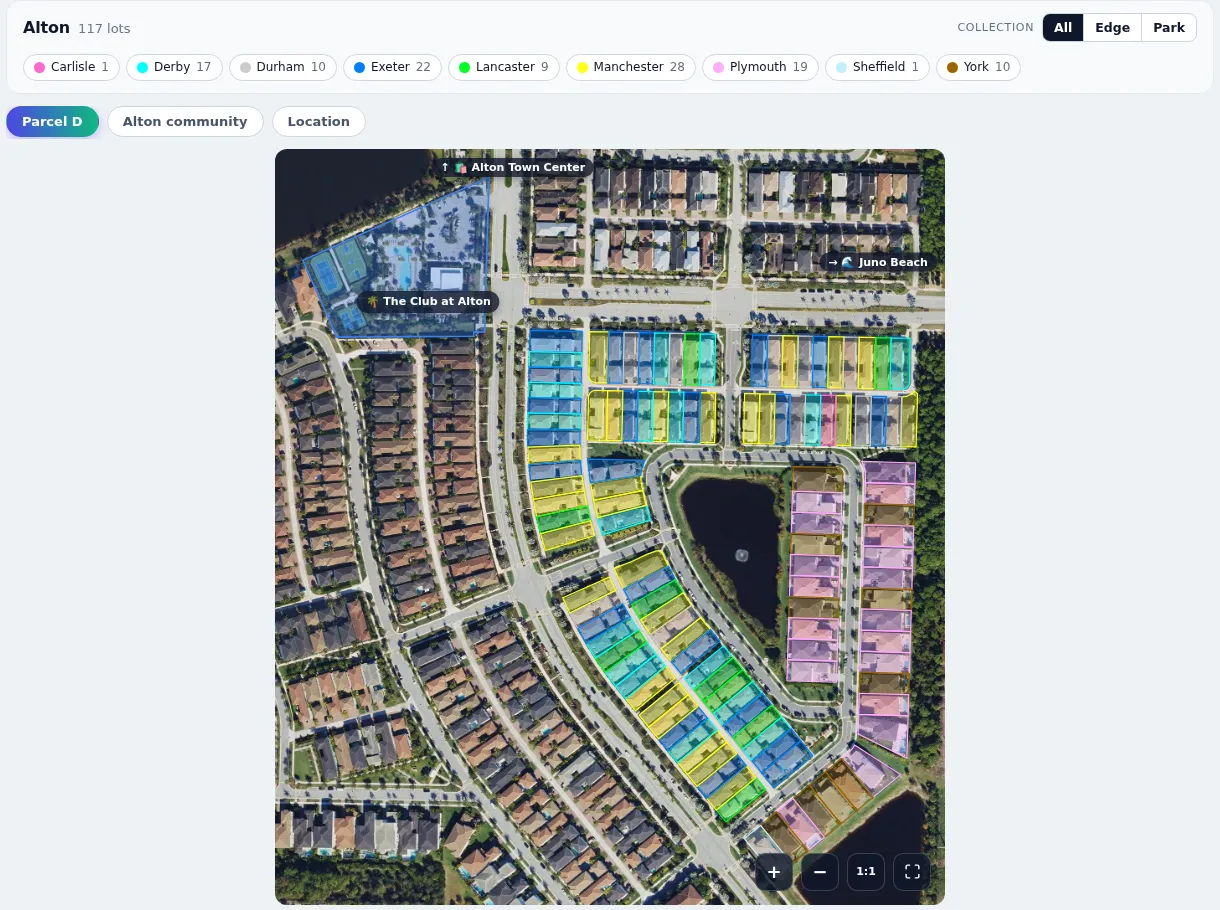 One neighborhood (117 homes) of the live Alton map we built for Alton Life Realty in Palm Beach Gardens, FL, colored by home model, with pins for the clubhouse and town center. The full map covers all 931 homes. Open the live map. A resort map traces rooms and villas the same way.
Each room or villa can carry:
| Field | Example |
|---|---|
| Room or villa number | Villa 7 |
| Type | Garden king, two-bedroom villa, beach cottage |
| View | Gulf view, pool view, garden |
| Sleeps | 4 |
| Beds | 1 king + 1 queen sofa bed |
| Floor | Ground floor or upper floor |
| Location notes | Near beach access, quiet end, by parking |
| Photos | The room, or that room type |
| Floor plan | The room or villa layout |
| Price | Shown or hidden across the whole map |
| Inquiry | One-tap form, call or WhatsApp |
Nightly rates change by date, so a hotel will usually hide prices and leave rates to its booking engine or reservations team. Today prices are shown or hidden across the whole map; a per-room “on request” option is in development.
Color by room type. Rooms can be colored by type, with a key that shows how many of each there are, the same way a home builder colors lots by model. Visitors can use filter chips to narrow the map to one type, such as two-bedroom villas, and see only where those sit on the property.
Photos per type save work. Twenty identical garden rooms can share one gallery and floor plan.
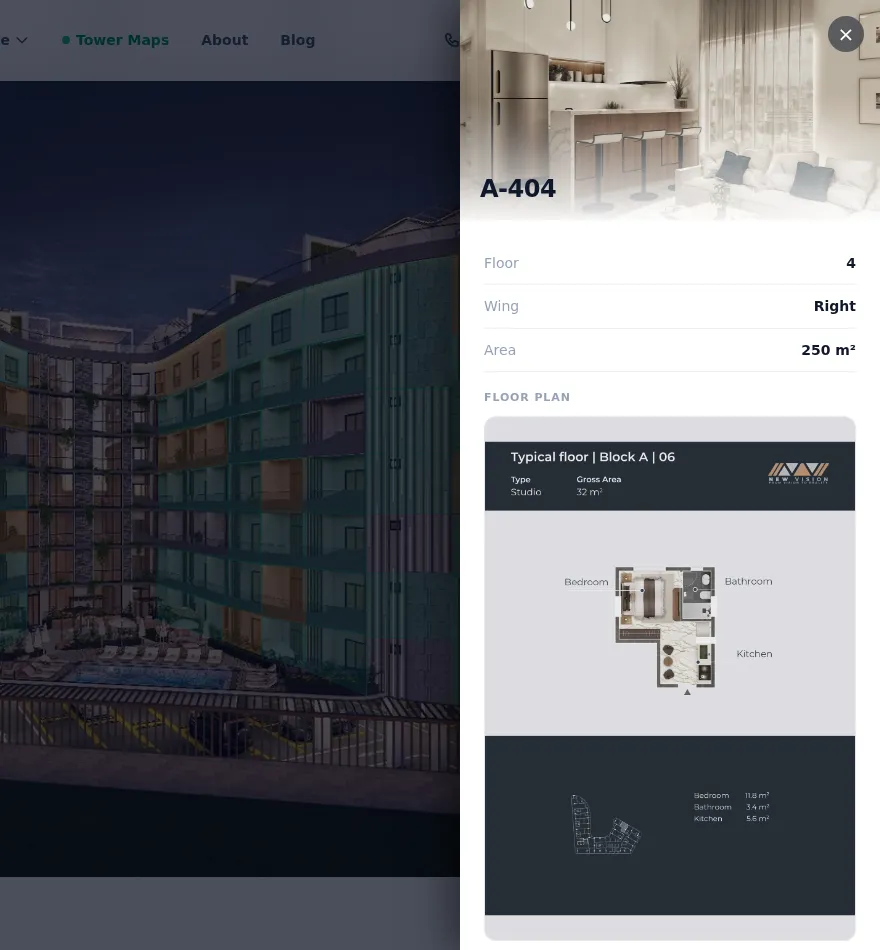 A unit panel from one of our condo tower demos, with its details, a photo and a floor plan. A room or villa panel works the same way.
Two-story buildings: one view per floor
Many low-rise properties have two floors, like a motel with an upstairs walkway or a wing with garden rooms below and balcony rooms above. One aerial image can’t show both levels.
The map handles this with views, shown as tabs: one for the whole property with its amenity pins, one for the ground floor, one for the upper floor. A guest who needs a ground-floor room opens that view and sees exactly which rooms qualify.
Where it’s relevant, add a note such as “ground floor, near parking,” and confirm the details when the guest inquires.
Use 1: marketing, groups and events
For a hotel or resort that rents rooms by the night, the interactive resort map is a “choose your room type and location, then inquire” tool. It sits on your website next to your booking engine, not in place of it.
Where it earns its keep is group and event sales:
- Room blocks. A planner organizing a retreat can point to the rooms they want together, such as the eight pool-side rooms in one wing.
- Weddings. A couple can pick the villa for the wedding party and cottages for family, and see how far each is from the lawn or beach.
- Repeat groups. Families can ask for “the same three cottages near the dock” and your team knows which ones.
The inquiry names the rooms, so your sales manager quotes specific rooms instead of asking “what are you looking for?”
The map also works as a shareable link, so your sales team can send it to a planner instead of a PDF or put it in a proposal.
Use 2: selling villas and units in a resort
Some resorts sell their villas, cottages or condo-hotel units. Buyers want what a home buyer wants from a lot map: which units are left, where each sits, what it looks like and what it costs.
Here the map works like an interactive lot map for home builders. Each villa shows its status (Available, Reserved or Sold), its price if you show prices, its floor plan and photos. When a buyer puts down a deposit, your sales team marks the villa Reserved in the dashboard, and every visitor sees it immediately. The map takes no deposits or payments itself.
A resort selling a new phase while operating the existing one can give each its own view. The map doesn’t handle contracts, rental programs or ownership terms; those stay with your sales team.
How status works on an interactive resort map
Tower Maps has three statuses: Available, Reserved and Sold. Your staff set them in the dashboard; nothing updates from a booking system. That makes status most useful where someone on your team already tracks it:
- Villas or units for sale. Available, Reserved and Sold mean exactly what they say.
- Long stays. For monthly or seasonal rentals, mark a cottage Reserved when it’s taken for the season.
- Event blocks. Mark the rooms held for a wedding or group as Reserved so the planner can see their block on the map.
For nightly rooms, availability changes by date, and a single color can’t show that. Use the map to show room type and location, and send the guest to your booking engine or reservations team for dates and rates. It’s the same approach we describe for nightly stays in lot maps for manufactured home and RV communities.
Static property map vs interactive resort map
| Static property map | Interactive resort map | |
|---|---|---|
| Where a room is | On the drawing, no details | On the map, with room details |
| Room type and view | Separate room pages | On each room, tap to see |
| Photos and floor plan | A gallery page | In the room’s panel |
| Two floors | One flat drawing | One view per floor |
| Amenities | Labels on the drawing | Pins for pool, beach, restaurant, spa |
| Group requests | Back-and-forth emails | ”These eight rooms in the east wing” |
| Villas for sale | Separate listings page | Status on the map, and price if shown |
| Updating | Edit and re-upload | Change one room in the dashboard |
What it is not
To be clear about what you’re getting:
- Not a booking engine. No availability by date, no online reservations, no payments.
- Not a channel manager. It doesn’t connect to OTAs or sync rates and inventory.
- Not a property management system. It has no PMS integration, guest profiles or housekeeping.
Inquiries go to your reservations or sales team, who handle them as they do now.
How to get one
FoudaTech builds interactive resort maps with Tower Maps as a done-for-you service. You don’t need to rebuild your website.
- Send your property map: a site plan, illustrated map or aerial photo. For two-story buildings, send a plan of each floor if you have one.
- Send the room data: numbers, types, views, sleeps, beds, floor and any location notes. A spreadsheet is fine.
- Send photos and floor plans per room type, or per villa if each is different.
- We map every room and amenity, set up the views and the dashboard, and match the map to your brand.
- You embed it with one script tag on WordPress, Webflow or a custom site, and share it as a link.
Pricing (USD):
- Small property (one view, a few unit types): from $2,000 setup + $600/year
- Larger resorts with several areas or phases: quoted from your property map and room list
The subscription covers hosting, the dashboard, updates, support and edits. The map system is already built and running, so your map can be live in 2–3 days once we have your property map, room list, floor plans and photos. Larger projects take longer, and we’ll tell you up front. A small motel or cottage property may fit the small-property price; a resort with several buildings, floor views and villas for sale is quoted after a free demo, from its map. The same things drive the price as for any site map, such as the number of rooms, views and photo galleries; see what drives interactive site plan cost.
Request a free demo of your property or see a live demo →.
See It Live: Alton, Florida
Alton is a residential community rather than a resort, but it shows the same map system working at full scale. Alton, in Palm Beach Gardens, Florida, has 931 homes in four neighborhoods, built in 17 home models. We built its map for Alton Life Realty, a real estate team that focuses on Alton. Every home is outlined on aerial imagery and colored by its model, a key counts the homes of each model, and one tap shows a home’s address, model, bedrooms, bathrooms, square feet and floor plan.
The team saw a free demo of one neighborhood the day after their first email, and the full map went live on their own website nine days after that email. Open the live Alton map or read how we built it.
Frequently Asked Questions
Can guests book a room through the interactive resort map?
No. Tower Maps isn’t a booking engine. It shows each room’s type, view, beds, photos and floor plan, and sends inquiries to your reservations or sales team. Your existing booking engine stays where it is.
Does the map show which rooms are free on my dates?
No. There’s no date-based availability. Status colors are set by your staff, so they suit villas for sale, long stays and event blocks. For nightly stays, guests choose a room type and location on the map, then inquire.
How do two-story buildings work?
Each floor can be its own view, shown as a tab, so guests can see exactly which rooms are on the ground floor.
Does it connect to our PMS or the OTAs?
No. It has no PMS, channel manager or OTA integration. Your team updates the map in its dashboard, separately from your other systems.
Can a resort selling villas use it?
Yes. Each villa or unit can show Available, Reserved or Sold, photos and a floor plan, and your sales team updates status from the dashboard. Today prices are shown or hidden across the whole map; a per-villa “on request” option is in development.