 Omar Fouda
Table of Contents
- What Is an Interactive Community Map?
- Why Community Specialists Need More Than an IDX Search
- What Goes on the Map
- How It Helps You Win Listings
- How It Keeps Buyers on Your Site
- Interactive Community Map vs a Static Site Plan PDF
- How to Get One
- See It Live: Alton, Florida
- Frequently Asked Questions
What Is an Interactive Community Map?
An interactive community map is the site plan of the community you work, turned into a clickable guide on your website. Every lot is a shape a visitor can tap. Each one opens a panel with the home’s model name, floor plan, bedrooms, bathrooms and size. The clubhouse, pool, town center and trails are pins that open photos. And the homes you currently have listed are marked by their status, so a buyer can see exactly where your listings sit in the community.
Alton Life Realty, a team that works one Palm Beach Gardens community, found us through our blog; their map of all 931 homes went live on their own site nine days after their first email. Open the live Alton map or get a free demo of your community; small communities start from $2,000 setup + $600/year.
If you are an agent or a small brokerage that works one community, you already know it better than anyone. You know which street backs onto the greenbelt, which model has the main-floor primary suite, and which section is a short walk to the clubhouse. The problem is that none of that knowledge shows up on your website. Your site looks like every other agent’s site: a headshot, a contact form and an IDX search that shows the same listings a buyer can find on any portal.
A community map puts your knowledge on the page. It is the same technology home builders use to sell new lots, applied to a resale community you specialize in.
Why Community Specialists Need More Than an IDX Search
Your IDX or MLS search does an important job, and a community map does not replace it. It answers “what is for sale right now, and what does it cost?” That is the question every portal answers too, which is exactly why it doesn’t set you apart.
A buyer moving into a master-planned community asks different questions first:
- Which neighborhood is this, and how far is it from the pool?
- What model is that house, and what does the floor plan look like?
- Which streets have the larger lots?
- Where are the homes I’d actually want, even if they aren’t for sale today?
An IDX search can’t answer most of these, because it only knows about active listings. A resale community might have hundreds of homes and only a handful on the market at any time. The other homes, the ones that make up the neighborhood the buyer is choosing, are invisible.
The community map shows all of them. Your site keeps a clear link to your listings search, so a buyer who wants to filter by price can still do that. The map sits alongside it and answers the questions that come before a search.
To be clear about what this is: the map does not connect to the MLS. Your listings on the map are entered and updated by you in the dashboard. For a community specialist with a manageable number of active listings at once, that is a few minutes of work per listing.
What Goes on the Map
The base is an image you probably already have access to: the community’s site plan, a neighborhood map or an aerial photo. Every lot is traced as a clickable shape on top of it. The shapes scale cleanly from a desktop down to a phone.
Per-home details
Each home can carry:
- Address or lot number, and the neighborhood or section it belongs to
- Model name (the builder’s original plan name, which owners and buyers in these communities often use)
- Beds, baths and size
- Floor plan for that model
- Photos, where you have them
- Status for your active listings, and price if you show prices
Amenity pins
The clubhouse, pools, fitness center, town center, schools inside the community, parks and trailheads become points of interest. Tapping one opens a short description and a photo gallery. A buyer from out of state gets a feel for daily life in the community without having visited.
Your listings, marked on the map
The homes you’re currently selling stand out on the map with their status. Status uses three labels: Available, Reserved for a home under contract, and Sold. When a listing goes under contract, you flip it in the dashboard and every visitor sees the change straight away. Today prices are shown or hidden across the whole map; a per-home “on request” option is in development.
One-tap inquiry
Every home has an inquiry button. A message that arrives from the map names the exact home the buyer was looking at, so your first reply can be about that house rather than “how can I help you?”
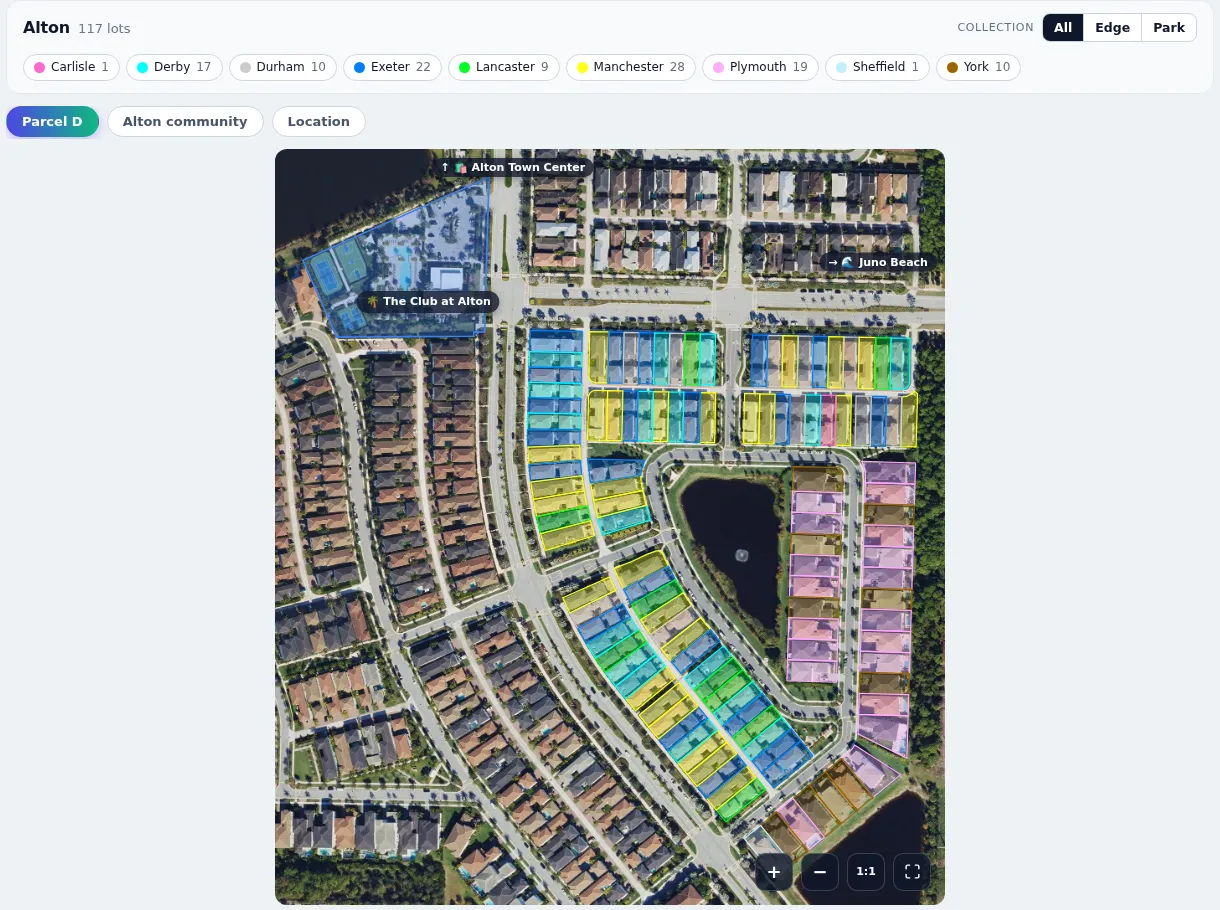 One neighborhood (117 homes) of the live Alton map we built for Alton Life Realty in Palm Beach Gardens, FL, colored by home model, with pins for the clubhouse and town center. The full map covers all 931 homes. Open the live map.
How It Helps You Win Listings
Sellers in a master-planned community choose the agent they believe knows that community best. A community map is a visible way to prove you’re that agent. For the plan around it, see our playbook on how to farm a master-planned community and our guide to community pages that rank and get leads.
It shows your expertise before the listing appointment
When a homeowner searches for agents in their community and lands on your site, they find their own street, their own model and the amenities they use every week, laid out properly. That is a stronger signal of local knowledge than a line in your bio saying you “specialize in” the community.
It gives sellers a better showcase
Tell a seller their home will appear on the community map, marked as your listing, beside the clubhouse and trails it’s close to, with the floor plan attached. That is a concrete thing you offer that a generalist agent can’t. A home marked on the map is seen in context, which is how buyers in these communities actually shop.
It makes your sold history visible
Homes you’ve sold can stay on the map marked Sold. Over time the map becomes a picture of your track record in the community, street by street. (Only show what you’re comfortable showing, and follow your brokerage’s and local board’s rules about publishing sold information.)
How It Keeps Buyers on Your Site
Buyers who start on a big portal tend to stay there. A buyer who finds your community map has a reason to stay on your site instead, and to come back.
- It’s useful even when nothing is for sale. A buyer planning a move next year can learn the neighborhoods and models now. That gives them a reason to bookmark your site, not a portal’s.
- It answers the questions portals don’t. Model, floor plan and where a home sits relative to the amenities are the details that help a buyer decide on a community, and they’re on your site.
- It turns curiosity into a named inquiry. A buyer who taps a home and asks “will this model come up for sale?” has told you what they want. That lead is worth more than an anonymous search alert.
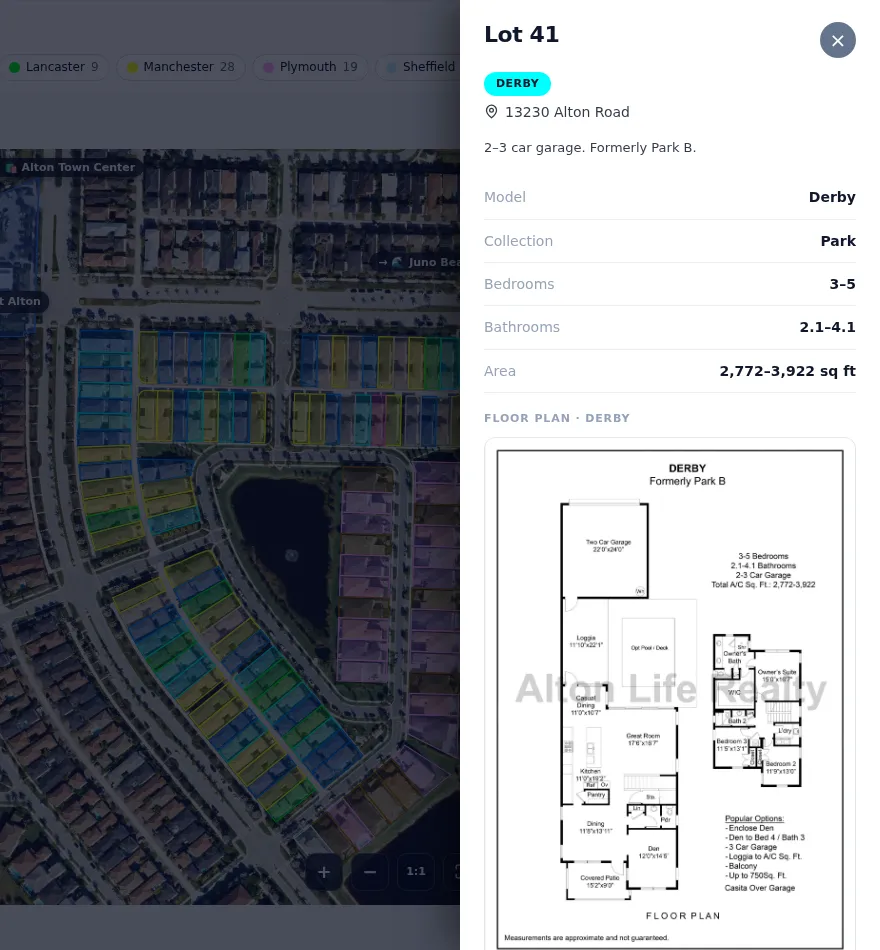 One home on the Alton map: model, bedrooms, bathrooms, size and floor plan.
Interactive Community Map vs a Static Site Plan PDF
Many community websites and agent sites already have a site plan, usually as a PDF or a flat image. Here’s how the two compare for an agent’s purposes.
| Static site plan (PDF or image) | Interactive community map | |
|---|---|---|
| Find a home | Zoom and squint at lot numbers | Tap the lot |
| Model and floor plan | Separate document, if at all | Opens with the home |
| Amenities | Labels on a drawing | Pins that open photos |
| Your listings | Not shown | Marked with their status, and price if you show prices |
| Phone | Pinch-zoom a PDF | Built for tapping |
| Updates | Re-export and re-upload | Change one home in the dashboard |
| Inquiries | Generic contact form | Names the exact home |
How to Get One
FoudaTech builds community maps with Tower Maps as a done-for-you service. You don’t configure a template yourself, and you don’t rebuild your website.
The process
- Send the base image: the community site plan, neighborhood map or an aerial photo.
- Send the home data you have: lot or address, model, beds, baths, size, floor plans, and your current listings. A spreadsheet is fine.
- We map every lot as a clickable shape and add the amenity pins with their photos.
- You get a dashboard to update listings, prices and status yourself.
- We deliver an embed: one script tag that goes into WordPress, Webflow or a custom site, beside your existing listings search. It also works as a shareable link you can send to sellers and buyers directly.
The map system is already built and running, so your map can be live in 2–3 days once we have your image, home list, floor plans and photos. Larger projects take longer, and we’ll tell you up front. If you’re comparing options, the questions in our site plan software checklist (embedding, sharing a link, who updates status) apply to agents too.
What it costs
Pricing is a setup fee plus an annual subscription (USD). The subscription covers hosting, the dashboard, updates, support and edits.
- Small community (one view, a few models): from $2,000 setup + $600/year
- Larger communities with several neighborhoods: quoted from your site plan and home list
A community with several hundred homes, multiple neighborhoods and a full set of amenity pins is quoted once we’ve seen the site plan and the data.
See a live demo → or request a free demo of your community.
See It Live: Alton, Florida
Here’s the community side of this setup, live for a real team. Alton, in Palm Beach Gardens, Florida, has 931 homes in four neighborhoods, built in 17 home models. We built its map for Alton Life Realty, a real estate team that focuses on Alton. Every home is outlined on aerial imagery and colored by its model, a key counts the homes of each model, and one tap shows a home’s address, model, bedrooms, bathrooms, square feet and floor plan. Filters cover Alton’s Edge, Park and Town collections, and pins show The Club at Alton, with the team’s own photos and videos, and Alton Town Center. The team’s map covers the community itself; it doesn’t mark listings or sold history.
The team saw a free demo of one neighborhood the day after their first email, and the full map went live on their own website nine days after that email. Open the live Alton map or read how we built it.
Related guides: Florida master-planned community maps, what an interactive site plan costs.
Frequently Asked Questions
Does the community map connect to the MLS or my IDX feed?
No. The map doesn’t pull from the MLS. You add and update your own listings in the dashboard, and your website keeps its existing listings search alongside the map. The map covers the community itself (every home, model and amenity), and your IDX search covers what is for sale across the market.
Can I show prices only on my own listings?
Not yet. Today prices are shown or hidden across the whole map; a per-home “on request” option is in development. Every home still displays its model, size and floor plan, and your listings stand out by their status.
Where does the model and floor plan information come from?
Usually from the community’s original builder plans and brochures, public records, and your own files. You send what you have, and homes can start with just the model and size. You can add floor plans and photos later through edits included in the subscription.
Can the map cover a community with several hundred homes?
Yes. The Alton map covers all 931 homes in four neighborhoods. A large community can be mapped lot by lot on one site plan, and buyers can zoom in to the neighborhood they care about. Bigger communities with many amenity pins take more setup work, which is reflected in the quote.
Will it work on phones?
Yes. The lot shapes scale to any screen, and tapping replaces hovering on mobile. The widget script is light and loads after your page, so it doesn’t weigh down your site.
What happens when one of my listings sells?
You mark it Sold in the dashboard and visitors see the change immediately. You can keep it on the map as part of your sold history.