 Omar Fouda
A community page is a page on your website about one community, subdivision or neighborhood. Done well, it’s where a buyer decides you know the place better than anyone, and where an owner checks what homes like theirs are worth. Done badly, it’s a paragraph about the area, a few stock photos and the same IDX feed every other agent in town has.
The strongest community pages show something portals don’t: every home in the community, not just the ones for sale. On Alton Life Realty’s website, that’s an interactive map of all 931 homes in Alton, Palm Beach Gardens, Florida, where one tap shows any home’s model, size and floor plan. We built it, and it went live nine days after the team’s first email. Open the live Alton map. Maps start from US$2,000 setup plus US$600 a year for a small community, after a free demo of one section of yours: request a free demo.
Table of Contents
- What Does Google Want From a Community Page?
- What Should a Real Estate Community Page Include?
- What Should You Leave Off?
- Fair Housing Rules for Community Pages
- Schema Basics for Community Pages
- A Community Page Outline You Can Copy
- Where the Map Fits
- Frequently Asked Questions
What Does Google Want From a Community Page?
Google’s own guidance reads like a brief for a good community page:
- Its helpful content guide asks whether your content shows “first-hand expertise and a depth of knowledge”, for example from “visiting a place”. An agent who works a community has exactly that.
- Its guide to generative AI features contrasts commodity content, such as “7 Tips for First-Time Homebuyers”, with non-commodity content that offers “unique expert or experienced takes”. A page full of facts only you know is the second kind.
- Its spam policies describe the opposite. Doorway abuse includes “pages targeted at specific regions or cities that funnel users to one page” and “substantially similar pages that are closer to search results than a clearly defined, browseable hierarchy”. Scraping includes republishing content from other sites without adding original content or value.
The lesson: a few deep pages beat dozens of near-copies with the community name swapped.
What Should a Real Estate Community Page Include?
Local knowledge only you have
Walking times to the clubhouse, which streets back onto the preserve, where guests park, which models have a main-floor primary suite, what changed this year. Facts like these come from working the community, and no portal has them.
A map of every home
An IDX search shows the homes for sale today. A community map shows all of them. On the Alton map, every home is outlined on 2025 aerial imagery and colored by its model, and a tap shows the address, model, bedrooms, bathrooms, square feet and floor plan, with filters for the Edge, Park and Town collections. To add one to your site, see how to add an interactive community map to your website.
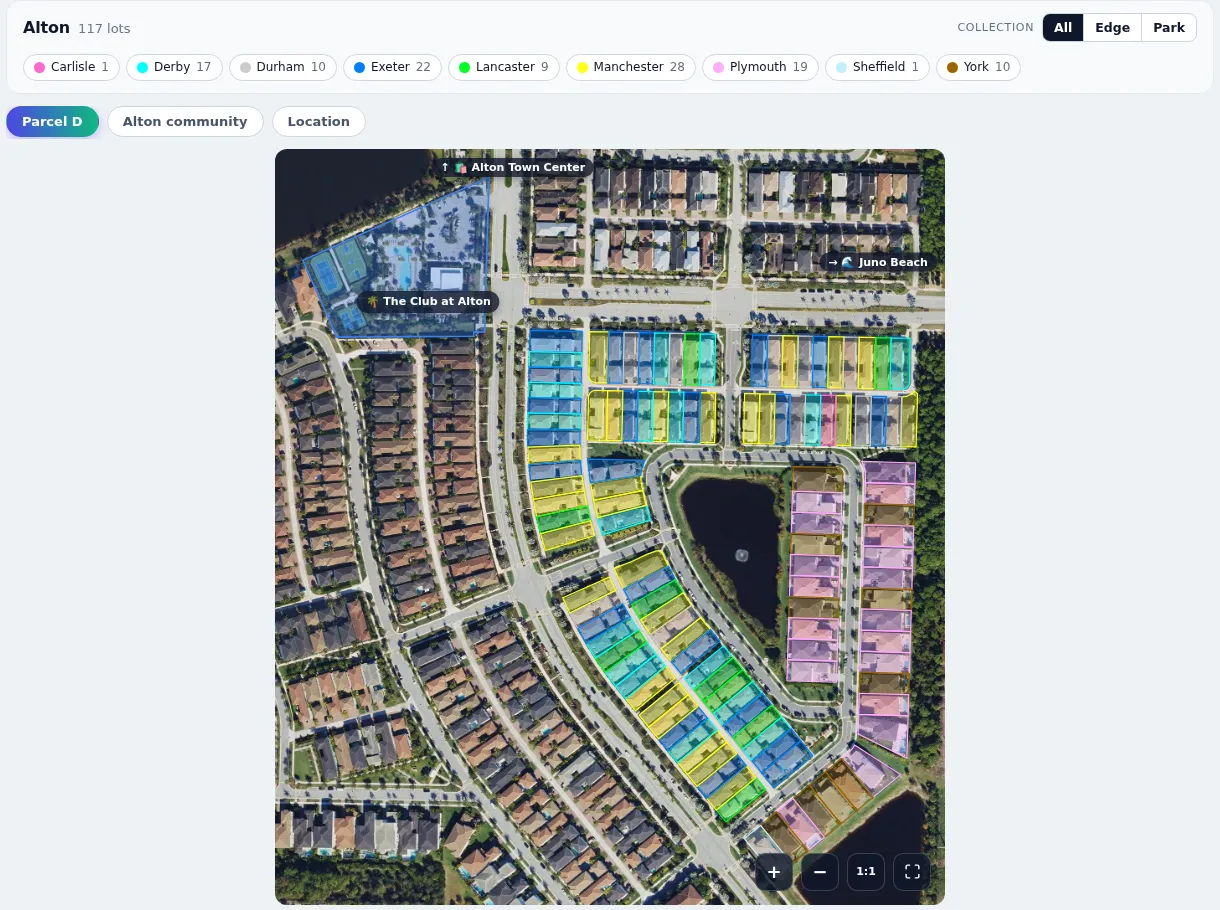 One neighborhood of the Alton map we built for Alton Life Realty in Palm Beach Gardens, FL: homes colored by model, with pins for the clubhouse and town center.
Models and floor plans
In a community built in a set of models, buyers often compare homes by model. List each one with its collection, bedrooms, bathrooms, square feet and floor plan. Alton has 17 home models, and the map shows each one’s floor plan on every home built to it.
Amenities
The clubhouse, pools, town center, trails and parks, with your own photos and walking times. Alton’s map has a pin for The Club at Alton with the team’s own photos and videos, and one for Alton Town Center.
HOA facts with sources
The fee and what it covers, the management company, and the rules buyers ask about, such as rentals, pets and exterior changes. Put a source and date under each fact, for example “Source: HOA budget, adopted 2026”. If you aren’t sure of something, say so and offer to check.
Market data with a date and source
Closed sales, median price, days on market and homes for sale, each with a date range and source: “Closed sales, Sep 1 to Nov 30, 2026. Source: [your MLS].” Update it on a schedule, and follow your MLS’s rules for using its data. A number with no date can make readers doubt the rest of the page.
Photos and video
Your own photos of homes, streets and amenities beat stock images. Describe each one in its alt text, and keep the files small so the page stays fast on phones; unoptimized images are a common reason pages load slowly.
Questions and answers
Answer the questions buyers actually ask you. Google stopped showing FAQ rich results on May 7, 2026, according to its Search documentation updates, so write the answers for readers, not for a special search listing.
A lead form
Keep it short: name, email, an optional phone number, and “Which home or model are you asking about?” Say when you’ll reply. On the map, a buyer’s inquiry names the home they tapped, so your first reply can be about that house.
Internal links
Link the page from your main menu or a communities index, from your listings in the community, and from your market updates and blog posts. Google’s link guidance says “every page you care about should have a link from at least one other page on your site”, with anchor text that describes the page.
What Should You Leave Off?
- Copied text. Don’t paste the builder’s or the HOA’s description. Link to it and write your own.
- Template pages with only the name changed. That’s the doorway pattern Google describes.
- Numbers with no date or source.
- Claims you can’t back up. The NAR Code of Ethics (Article 12) asks REALTORS® to “present a true picture” in their advertising, so skip “#1 agent in the community” unless you can prove it.
- Stock photos of people. Photos of homes and amenities tell buyers more, and HUD’s advertising rule below covers photographs too.
- A page that’s only an IDX feed. Search results alone give a buyer nothing a portal doesn’t.
Fair Housing Rules for Community Pages
A community page is advertising, so fair housing law applies to every word and picture on it.
- HUD’s advertising rule, 24 CFR 100.75, makes it unlawful to publish an advertisement for the sale of a dwelling that indicates any preference, limitation or discrimination because of race, color, religion, sex, handicap, familial status or national origin. It covers “words, phrases, photographs, illustrations, symbols or forms”.
- HUD’s rule on steering, 24 CFR 100.70, includes discouraging a buyer because of the race, religion or other protected characteristic of the people in a community, and telling a buyer they would not be “comfortable or compatible” with existing residents for those reasons.
- For REALTORS®, Standard of Practice 10-1 of the NAR Code of Ethics says not to volunteer the racial, religious or ethnic composition of any neighborhood.
HUD withdrew its 2024 guidance on advertising through digital platforms, effective September 17, 2025, along with seven other guidance documents (Federal Register notice). The same notice says actions that don’t comply with the Fair Housing Act remain subject to enforcement, and the advertising rule above is still in the current Code of Federal Regulations.
In practice: describe homes, amenities and distances, never the residents or who the community “suits”. For schools, link to the school district’s own boundary information. This isn’t legal advice, so check your state’s rules and your broker’s policy too.
Schema Basics for Community Pages
Structured data helps Google understand a page, but Google’s structured data guidelines say it doesn’t guarantee that markup shows up in results, and that you shouldn’t mark up content readers can’t see. Keep it simple:
- BreadcrumbList. Breadcrumb markup shows where the page sits in your site, such as Home > Communities > Alton.
- RealEstateAgent. Schema.org’s RealEstateAgent is a type of LocalBusiness. Google’s local business guide suggests the most specific subtype, on a page with information about your business, so it usually belongs on your about or contact page.
- FAQPage. It no longer produces a FAQ rich result in Google, as noted above.
For the format, Google’s introduction to structured data recommends whichever is easiest for you to maintain, which in most cases is JSON-LD.
A Community Page Outline You Can Copy
- Title and H1: “[Community] Homes for Sale and Community Guide”
- Introduction: two or three sentences of facts: where it is, how many homes, how many neighborhoods.
- Interactive map of every home, with one line telling visitors to tap a home.
- Neighborhoods: a short paragraph on each.
- Home models: a table with collection, bedrooms, bathrooms, square feet and floor plan.
- Amenities: what’s there, your photos, walking times.
- HOA facts: fee, what it covers, key rules, management contact, each with a source and date.
- Market snapshot: closed sales, median price, days on market, homes for sale, with a date range and source.
- Homes for sale now: your IDX search, filtered to the community.
- Getting around: drive times to the places buyers ask about.
- Schools: a link to the district’s boundary information.
- Questions and answers: four to six you actually get.
- Contact: a short form that asks which home or model.
- Related pages: nearby communities, your market updates and guides.
Where the Map Fits
Put the map right after the introduction. It answers the questions buyers ask before they search: which model is that house, where are the other homes of the model I like, how far is it to the clubhouse. Your IDX search stays further down the page. The map doesn’t replace it, and nothing syncs between them: the map shows every home, and any status on a home is set by hand in the dashboard.
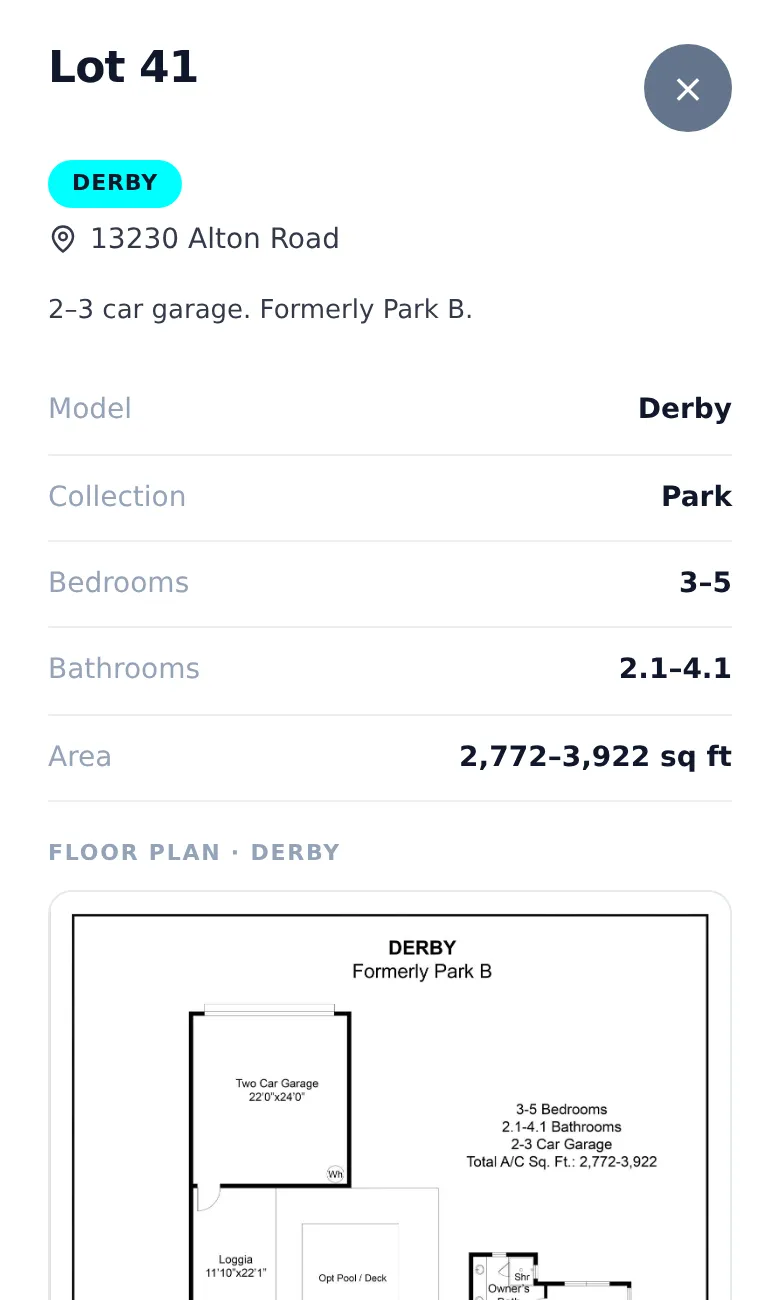 One home on the Alton map we built for Alton Life Realty in Palm Beach Gardens, FL, as it looks on a phone.
It goes in with one script tag or an iframe. On Alton’s Placester site we used an iframe on its own page, linked from the main menu and a homepage tile. A community page with a map is also the center of a farming plan; see how to farm a master-planned community and interactive community maps for real estate agents. For a large community, read Florida master-planned community maps.
Pricing (USD): from $2,000 setup plus $600 a year for a small community; larger communities are quoted after a free demo. Once we have your site plan or aerial, home list, floor plans and photos, a map can be live in 2 to 3 days. Larger communities take longer. See how community maps work or request a free demo.
Frequently Asked Questions
How long should a community page be?
Long enough to answer a buyer’s real questions with facts. Google says it doesn’t have a preferred word count, so write until the questions are answered, then stop.
Can I copy the HOA’s or builder’s description?
Better not. Google’s spam policies treat republishing content without adding original value as scraping. Link to the source and write your own description.
Should every neighborhood get its own page?
Only if you have enough unique content for each one. Otherwise, use one strong page with a section per neighborhood. Google’s doorway policy warns against substantially similar pages aimed at specific places.
What should a community page avoid saying?
Anything that describes who lives there, or who the community suits, based on race, color, religion, sex, disability, familial status or national origin. Describe homes, amenities and distances instead.
Is FAQ schema still worth adding?
Not for a Google rich result. Google stopped showing FAQ rich results on May 7, 2026. Write your questions and answers for readers.
Does a community map replace my IDX search?
No. The map shows every home with its model and floor plan, and IDX shows what’s for sale. Nothing syncs with the MLS, so keep both on the page.