 Omar Fouda

An interactive community map puts every home in your community on your own website. A buyer taps a home, sees its model, size and floor plan, and can send you a question that names that exact house. Adding one takes one short piece of code. The tricky part is knowing where your website platform lets you paste it, and that’s what this guide covers.
We build these maps for agents and teams, and we’ve done this on a real agent website. The Alton map shows all 931 homes in a Palm Beach Gardens, Florida community on the Alton Life Realty team’s own Placester site. It went live with one line of code nine days after the team’s first email. Open the live Alton map. Maps start from US$2,000 setup plus US$600 a year for a small community, and we build a free demo of one section of yours first: request a free demo.
Selling condos in a tower instead? Read the vertical version: how to add an interactive floor plan to your website.
Table of Contents
- What You Need Before You Start
- Two Ways to Embed a Community Map
- How We Added the Alton Map to Placester
- How to Add the Map on WordPress
- Luxury Presence, BoldTrail, Real Geeks and Sierra Interactive
- Squarespace, Wix and Webflow
- Which Platforms Limit Custom Code?
- How Tall Should the Map Be on Phones?
- Use the Shareable Link Too
- What If Your Platform Blocks Custom Code?
- Frequently Asked Questions
What You Need Before You Start
- Your map. We build it from your site plan or an aerial photo, your home list, floor plans and photos. With all of that in hand, it can be live in 2 to 3 days. Larger communities take longer.
- Edit access to your website, with a user role (and on some platforms, a plan) that allows code.
- A page for it. A page of its own in your main menu works well, or a community page you already have.
The map doesn’t connect to your MLS, IDX or CRM, and any status you show on a home is set by hand in the dashboard. Keep your IDX search beside it.
Two Ways to Embed a Community Map
Every map comes with two ways to put it on a page. We send you both, with your map’s ID filled in.
Option 1: a script tag and a div. The map draws itself inside the div, right in your page.
<div id="tower-map" data-tower="your-map-id"></div>
<script defer src="https://tower-maps.foudatech.com/embed/widget.js"></script>
Option 2: an iframe. The iframe shows the map’s own page in a window on your page.
<iframe src="https://tower-maps.foudatech.com/m/your-map?embed=1"
  title="Interactive map of every home in Your Community"
  width="100%"
  style="border:0;height:clamp(900px, calc(55vw + 400px), 1250px)"></iframe>
The ?embed=1 drops the map page’s own background and padding, so the map sits flush in your page. The title labels the frame for people who use screen readers, as MDN recommends.
Which one should you use? If your platform runs JavaScript in page content, use the script. If it accepts HTML but not JavaScript, use the iframe. Where a platform may strip iframes, try the script. The sections below go by each platform’s own help pages.
How We Added the Alton Map to Placester
The Alton Life Realty website runs on Placester Classic, the WordPress-based version of Placester. Placester’s article on adding HTML to a page says you can embed HTML or an iframe with the HTML tool in the page editor, and adds: “You can only add HTML here, not JavaScript.” All code must also use https. That made the iframe the right choice.
Here’s what we did, following Placester’s steps:
- From the Placester dashboard, open the three-dot menu and choose Edit Site.
- Open the Pages tab and click (+) to create a page. Ours is called “Alton Interactive Map”.
- In the page editor, click the HTML tool (
</>), paste the iframe line and click Update. - Put the page in your main menu. Placester Classic can also add a menu item that links to any custom URL, under Site Settings > Menu.
Two things we learned along the way:
- The Classic homepage doesn’t take code. On that theme, the area under the main photo takes Featured Content tiles, not HTML. So the homepage has a tile, “Alton Interactive Map: Tap any home to explore”, linking to the map page. Placester says Featured Content tiles are for Pro users on the Highland, Wilshire, Beacon and Newbury themes, with up to four tiles.
- Keep the tile image simple. The theme served our tile image 650 pixels wide, so a map picture with small labels looked soft. A plain picture of the homes worked better.
On Placester’s newer Codeless sites, custom JavaScript comes with upgraded plans and goes in the customizer’s Custom JS settings. We haven’t put a map on a Codeless site yet, so ask Placester support which option fits your page.
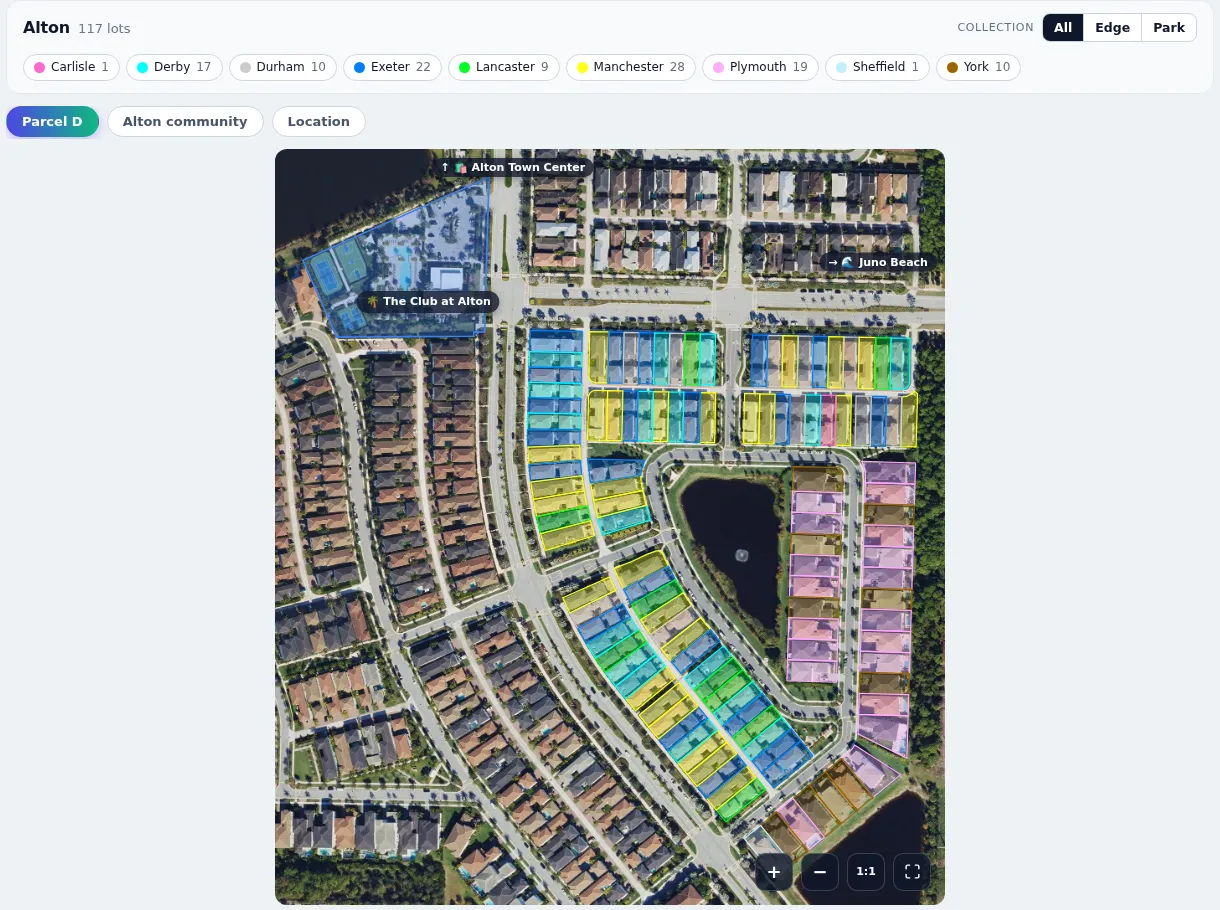 One neighborhood of the Alton map we built for Alton Life Realty in Palm Beach Gardens, FL: homes colored by model, with a key that counts each model and pins for the clubhouse and town center.
How to Add the Map on WordPress
On a self-hosted WordPress site, use a Custom HTML block. WordPress’s Custom HTML guide gives the steps:
- Click the Block Inserter, or type
/htmlin a new paragraph and press Enter. - Click Edit HTML, paste the code and press Update, then publish the page.
Your user role matters. WordPress says that if a user lacks the unfiltered_html capability, it strips tags such as <script> and <iframe> when the page is saved. On a normal single site, Administrators and Editors have that capability; Authors and Contributors don’t, and on Multisite only Super Admins do. If the map disappears after you save, check your role first.
On WordPress.com, your plan decides. Its guide to adding code says free sites have limits, and that iframe and script are available on a plugin-enabled plan once hosting features are activated.
Luxury Presence, BoldTrail, Real Geeks and Sierra Interactive
These platforms are built for agents, and each has its own place for outside code.
Luxury Presence. Its help article, Can I add custom HTML or embed code to my website?, says that on most templates you add a Custom Content section in the Website Builder and paste the embed code. Some templates don’t support raw HTML. If you don’t see a Custom Content or HTML section when you add a section, ask Luxury Presence support to start a developer request.
BoldTrail (kvCORE). BoldTrail is the next generation of kvCORE. Its Page Editor guide says to go to Web & IDX > Website Management > Pages, create a custom page and drag in the Custom HTML content block. Publish with the page set to Active; it can take up to 20 minutes to appear. BoldTrail warns that your own code may stop a design from adjusting to screen size, and the guide doesn’t say whether scripts run in that block, so start with the iframe and check the live page.
Real Geeks. Real Geeks’ guide to adding custom code to a page says the Source Code button (<>) works anywhere the page editor appears, including the home page, content pages, area pages and blog posts. Click <>, paste the code where you want the map, click OK, then Save. Real Geeks suggests testing on a draft page first and checking the tool works on mobile.
Sierra Interactive. Sierra’s article on Shared HTML Widgets gives two routes. For one page, add a Page Component, choose Content Area and paste the code. To reuse it, create a Shared Widget (type: JavaScript/Style Code) under Content > Shared Widgets. Sierra says iframe embeds aren’t guaranteed on every page type and may be stripped in blog posts and some layouts, so try the script on a standalone content page.
Squarespace, Wix and Webflow
Squarespace. Edit the page, click Add block or +, choose Code, click the pencil and paste, with the block’s Mode set to HTML. Squarespace’s code block guide says that to add JavaScript or an iframe, your site needs the Core, Plus or Advanced plan. Code sometimes doesn’t show while you’re logged in, so check the page logged out.
Wix. In the Wix Editor, go to Add Elements > Embed Code > Popular Embeds. Choose Embed a site and enter the map’s own address, or Embed HTML and paste the code, then click Apply. Wix’s embed guide says only https code is displayed and that these elements are iframes, so you set the size of the box. If it doesn’t fit on phones, Wix suggests adding a mobile version in the mobile editor. The guide doesn’t mention a plan requirement for these elements.
Webflow. Drag a Code Embed element into the section where the map should go, paste the code, and check it in Preview. Webflow University says the Code Embed element requires a paid site plan or Workspace.
Which Platforms Limit Custom Code?
Here’s what each platform’s help page says, side by side. The last column is our suggestion, not theirs.
| Platform | Limits in their docs | Try first |
|---|---|---|
| Placester Classic | HTML only, no JavaScript | Iframe |
| WordPress (self-hosted) | Your role needs unfiltered_html | Either |
| WordPress.com | Plugin-enabled plan, hosting features on | Either |
| Luxury Presence | Some templates need a developer request | Either |
| BoldTrail | Own code may affect screen sizing | Iframe |
| Real Geeks | None stated | Either |
| Sierra Interactive | Iframes may be stripped on some pages | Script |
| Squarespace | Core, Plus or Advanced plan | Either |
| Wix Editor | Https only | Embed a site |
| Webflow | Paid site plan or Workspace | Either |
How Tall Should the Map Be on Phones?
An iframe keeps the height you give it. Too short, and buyers scroll inside a small box. Too tall, and there’s empty space under the map. On the Alton page we used this:
height: clamp(900px, calc(55vw + 400px), 1250px);clamp() takes a minimum, a preferred value and a maximum. Here the frame is never shorter than 900 pixels or taller than 1,250, and in between it grows with the screen width (55% of the window width plus 400 pixels):
| Screen width | Frame height |
|---|---|
| 390 px (a phone) | 900 px |
| 768 px (a tablet) | 900 px |
| 1,024 px | about 963 px |
| 1,366 px (a laptop) | about 1,151 px |
| 1,920 px (a large monitor) | 1,250 px |
The reason for this shape: on a phone, the key and the neighborhood buttons sit above the map, so the frame needs room for both. On a computer they sit beside the map, and the map grows with the screen.
Before you share the page, check it on your own phone: scroll past the map with your thumb, tap a home and open its floor plan, switch neighborhoods, and turn the phone sideways.
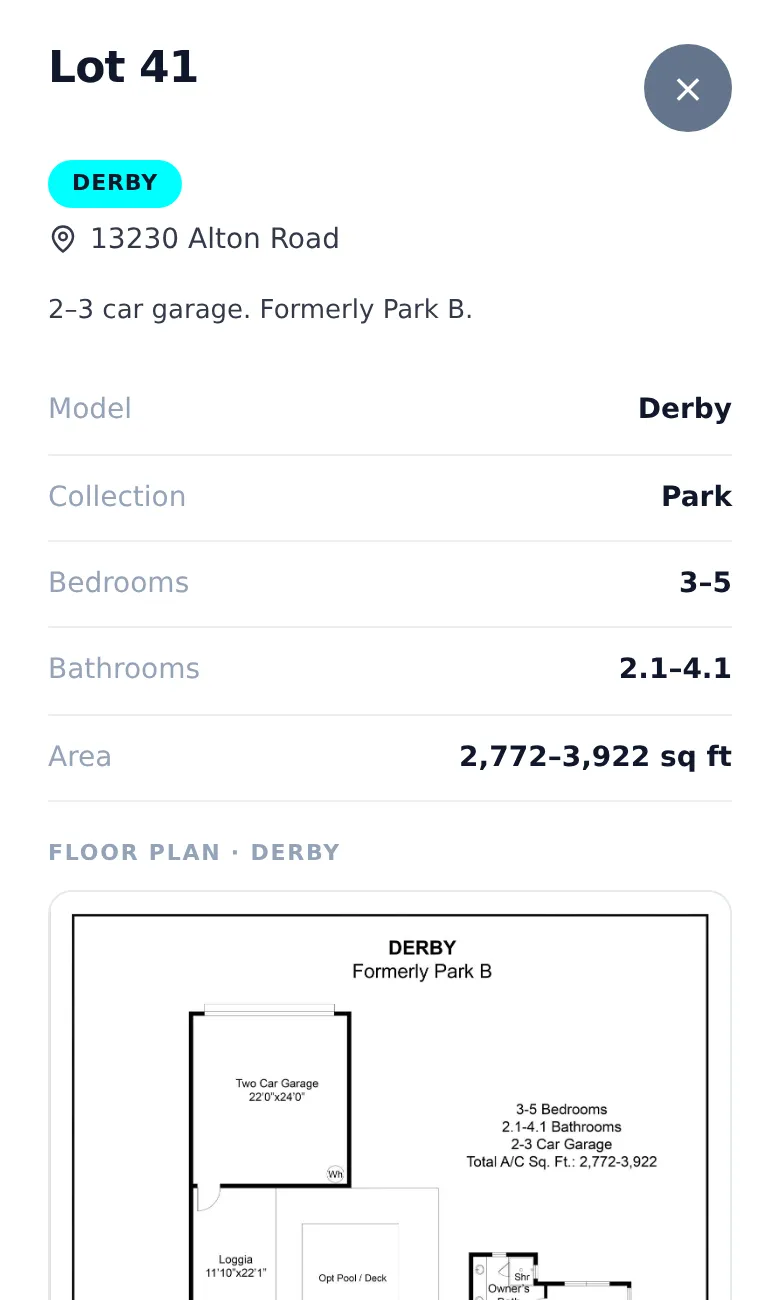 One home on the Alton map we built for Alton Life Realty in Palm Beach Gardens, FL, as it looks on a phone.
Use the Shareable Link Too
Every map also has its own page, at an address like tower-maps.foudatech.com/m/your-map. You can use it without touching your website: text it to a buyer after a call, email it to a seller before a listing appointment, put it behind a QR code on a mailer, or post it on social media.
On your website, put your own words around the map, such as a short introduction to the community, its neighborhoods and its models. Don’t count on the map alone to make the page rank. Our guide to community pages that rank and get leads has an outline to copy, and how to farm a master-planned community shows where the map fits in your marketing.
What If Your Platform Blocks Custom Code?
Work down this list:
- Try the other method. Use the iframe if scripts are stripped, and the script if iframes are stripped.
- Check your role and plan against the table above.
- Ask your platform’s support. Luxury Presence handles it as a developer request, and Sierra’s in-house team does custom work for an hourly fee.
- Link to the map instead. A menu item, a button or a homepage tile that opens the map’s own page still puts every home one tap away.
- Let us do it. Add us as a user on your website and we’ll paste the code and test it on desktop, tablet and phone, as we did on Alton’s Placester site. Please don’t email us a password; a user invite is safer.
Tell us your platform when you request a free demo, and we’ll tell you which line to use. For what moves the price, see interactive site plan cost. For how agents use the map to win listings, see interactive community maps for real estate agents, or read how we built the Alton map.
Frequently Asked Questions
Do I need a new website to add a community map?
No. The map goes onto a page of your current site with one short piece of code, or you link to the map’s own page. The Alton map runs on the team’s existing Placester website.
Should I use the script tag or the iframe?
The script if your platform runs JavaScript in page content, and the iframe if it accepts HTML but not JavaScript, as Placester Classic does. Where iframes may be stripped, as on some Sierra Interactive layouts, use the script. We send you both.
Does it work on Placester?
Yes. The Alton map runs on a Placester Classic site in an iframe, added with the page editor’s HTML tool. A Featured Content tile on the homepage links to it.
How tall should the iframe be?
We use clamp(900px, calc(55vw + 400px), 1250px). That’s 900 pixels on phones and tablets, growing with the screen width up to 1,250 pixels on large monitors.
Will the map slow down my website?
In a Lighthouse test, the map showed in about 1.5 seconds on desktop and about 4 seconds on a slow phone connection, with no page jumping. The script tag uses defer, so the browser runs it after reading the rest of your page.
What does a community map cost?
From US$2,000 setup plus US$600 a year for a small community. Larger communities are quoted after a free demo of one section. New projects are paid 50% to start, 30% once you’ve tested the working map, and 20% at launch.