Table of Contents
- The Real Cost of a Static Floor Plan
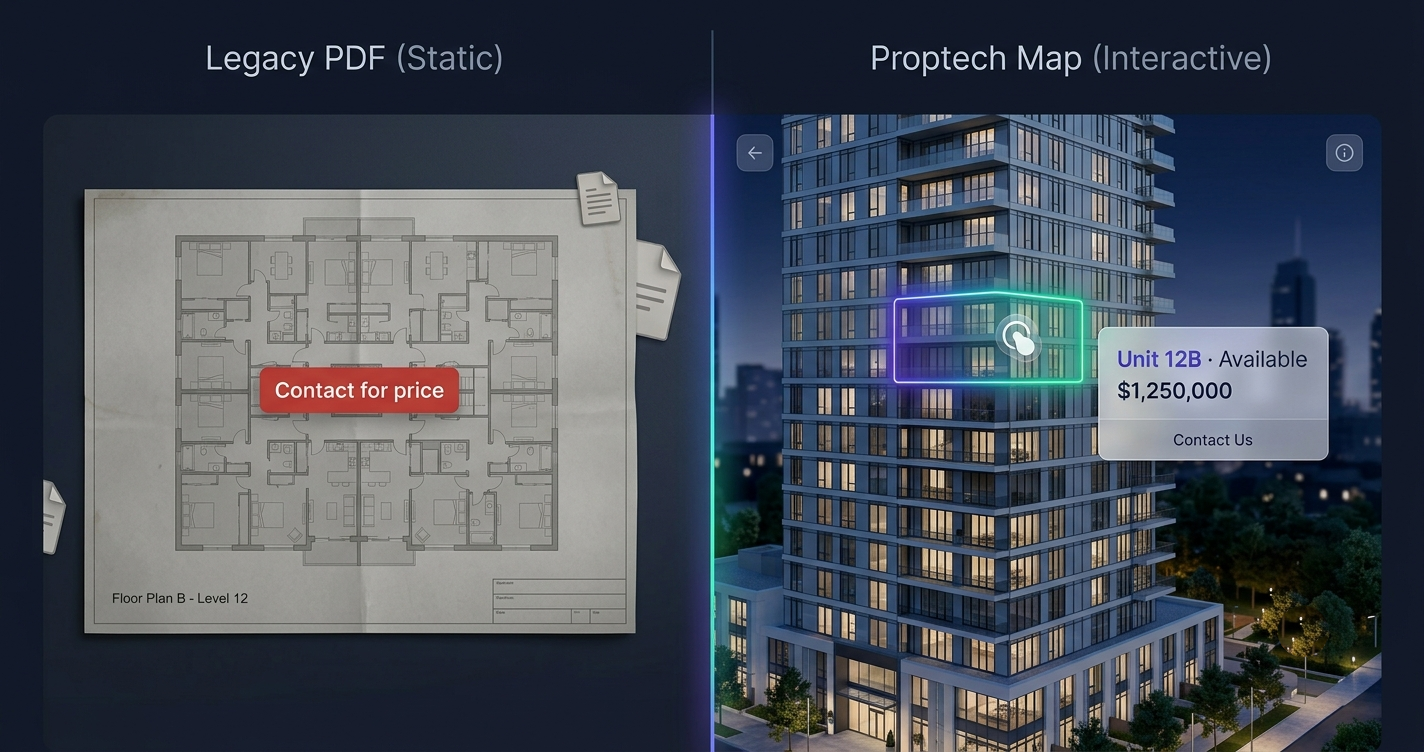
- Interactive Tower Map vs Static Floor Plan: Side by Side
- Where Static Floor Plans Lose the Sale
- What Changes With an Interactive Tower Map
- When Is It Worth Switching?
- Frequently Asked Questions
The Real Cost of a Static Floor Plan
Almost every developer selling off-plan uses the same setup: a beautiful tower rendering, a PDF of floor plans, and a price list you get “on request.” It looks professional. It also quietly loses sales.
Here’s the problem. A buyer interested in your development has three simple questions — which units are available, what do they cost, and what will I see from that floor? A static floor plan answers none of them directly. So the buyer either emails and waits, or moves on to the next development. Most move on. You never even know they were there.
That gap between interest and answer is where pre-sales leak. An interactive tower map closes it.
You’ll also hear this called an interactive floor plan, an interactive site plan, or a building visualizer — the same clickable-building idea under different names. Whatever you call it, the effect is measurable: surveys repeatedly find buyers are far more likely to enquire on a listing they can explore themselves (around 8 in 10 in some studies) than on a static PDF.
Interactive Tower Map vs Static Floor Plan: Side by Side
| Factor | Static Floor Plan / PDF | Interactive Tower Map |
|---|---|---|
| Per-unit pricing | ❌ “Contact for price” | ✅ Shown on hover / click |
| Availability | ❌ Ask by email/phone | ✅ Live: Available / Reserved / Sold |
| Unit exploration | ⚠️ Flip through a PDF | ✅ Click any unit on the building |
| Mobile experience | ⚠️ Pinch-zoom a document | ✅ Tap-optimised, fast |
| Diaspora / remote buyers | ❌ High friction | ✅ Self-serve, 24/7 |
| Lead quality | ❌ “I’m interested” | ✅ Unit + floor + price specified |
| Sales-team time | 🔴 Repetitive Q&A | 🟢 Automated answers |
| Updating prices | ❌ Re-export the PDF | ✅ Dashboard — instant |
| Emotional engagement | Low | High — buyers picture a specific home |
Where Static Floor Plans Lose the Sale
1. The “contact for price” wall. Every time a buyer has to ask for basic information, you add friction and lose the ones who won’t. Serious buyers comparing options reward the developer who answers first.
2. Mobile. Most buyers browse property on a phone. A PDF floor plan on a phone is a pinch-zoom struggle. Interest dies on the small screen.
3. Remote and diaspora buyers. These are often your highest-value customers — and the ones a static PDF fails hardest, because they can’t visit and can’t easily evaluate what they’re buying. We cover this in depth in how to sell off-plan apartments faster.
4. Generic leads. A contact form submission that says “I’m interested in your project” tells your sales team nothing. They start every call cold.
What Changes With an Interactive Tower Map
Replace the static plan with a clickable building and the buyer’s journey changes at every step:
- They explore units themselves, at any hour, without a gatekeeper.
- They see price, availability, floor, and view instantly — no waiting.
- They picture a specific home — floor 12, ocean side — which creates emotional ownership before a single call.
- They inquire on an exact unit, handing your team a qualified, warm lead.
Your sales team stops answering “what’s the price of 6C” ten times a day and starts closing buyers who already know what they want. The full mechanism is in interactive floor plans for real estate developers.
When Is It Worth Switching?
An interactive tower map earns its keep when:
- You’re selling units in a multi-storey building (not single houses)
- You’re selling off-plan or during construction
- A meaningful share of buyers are remote or diaspora
- Your current site shows static images, a PDF, or “contact for price”
If that’s you, the math is simple: one extra unit reserved covers the cost many times over. And because it’s delivered as an embeddable widget with a management dashboard, it drops into your existing website without a rebuild.
See a live interactive tower map → or request a free preview of your own building — no cost, no commitment.
Frequently Asked Questions
Isn’t a good PDF brochure enough?
A PDF is fine for someone already committed. It’s poor at converting an undecided buyer, because it can’t show live pricing or availability, and it’s painful on mobile — exactly where and when most buyers browse.
Will an interactive tower map slow down my website?
No. A well-built one is a lightweight overlay on your existing image, engineered to load fast on mobile — not a heavy 3D model.
Can I keep pricing private but still show availability?
Yes. You choose what each unit reveals — you can show availability and details while keeping price “on request,” or display full pricing. It’s configurable per project.
Do I have to replace my whole website?
No — it’s a single embed that drops into your current site. Nothing else changes.
How do I get one?
You send your tower image and unit data; the map is custom-built to your building and delivered as an embed plus a dashboard, on a setup-fee-plus-subscription basis. Contact us to start with a free preview.
Does the availability update in real time?
Yes. A management dashboard lets your sales team flip a unit between available, reserved, and sold instantly, and the change shows on your site right away — no developer, no waiting. That live unit availability is what turns the map into a working sales tool rather than a picture.