Table of Contents
- Why Real-Time Unit Availability Matters
- The Sales Spreadsheet Problem
- How Live Availability Actually Works
- What You Gain: Urgency, Fewer Double-Bookings, Warmer Leads
- What Good Looks Like
- How to Get Real-Time Availability on Your Site
- Frequently Asked Questions
Why Real-Time Unit Availability Matters
Ask a buyer what they want to know before they enquire about your development and it comes down to one thing: is the unit I want still available? Real-time unit availability answers that question the moment they ask it — on your website, without an email, without waiting for someone to check a file.
Most developers can’t answer it that fast. The truth about which units are open, reserved, or gone lives in a shared spreadsheet the sales team guards. The website shows a beautiful render and a “contact for availability” button. So the buyer has to ask, wait, and hope the answer is still current by the time it arrives. That gap between question and answer is exactly where off-plan sales leak.
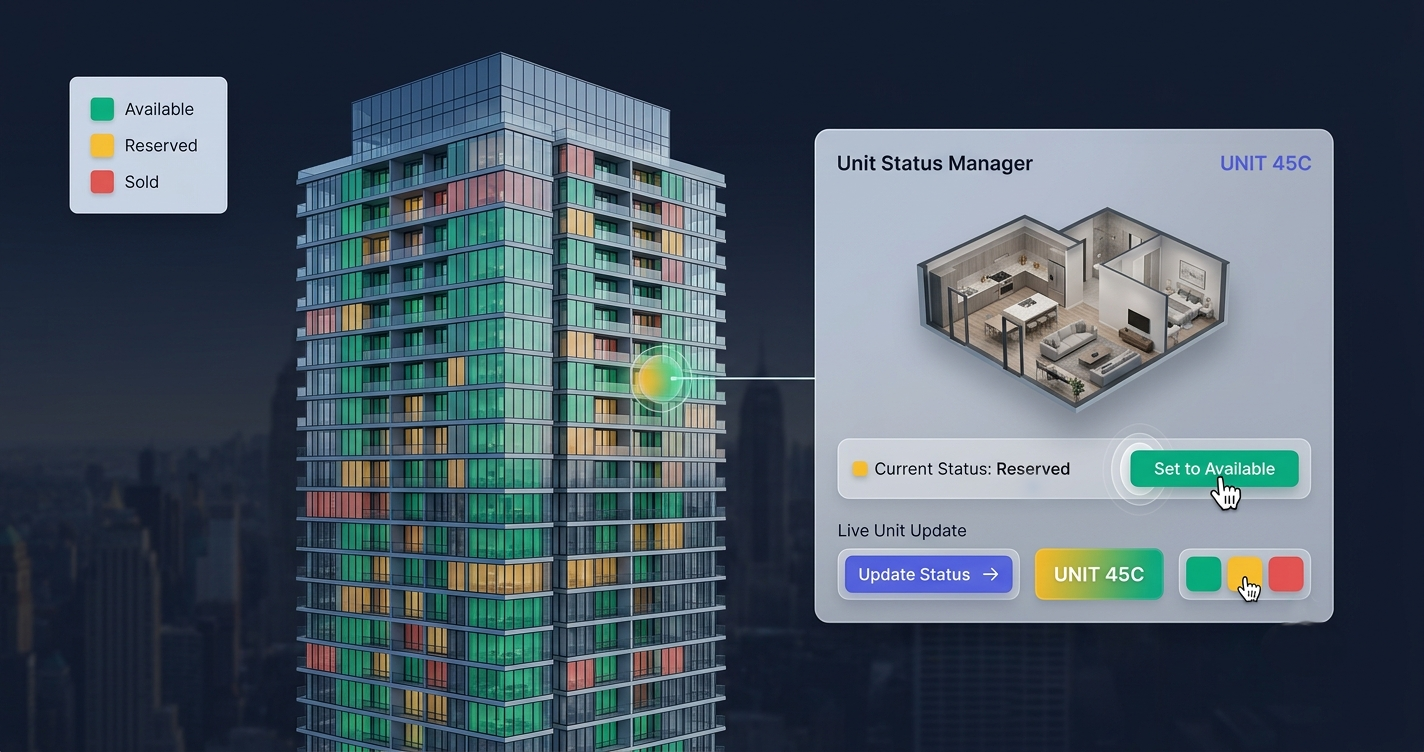
Real-time unit availability closes the gap. Every unit on your interactive tower map carries a live status — Available, Reserved, or Sold — color-coded and updated the instant your team changes it. Buyers get an honest, current answer themselves. And “only 3 left on this floor” stops being a line your salesperson says on the phone and becomes something the buyer can see with their own eyes.
The Sales Spreadsheet Problem
Almost every off-plan developer runs inventory the same way: a spreadsheet, sometimes a CRM tab, listing each unit and its status. It works internally. The problem is that buyers never see it — and the website never reflects it.
That disconnect creates real, recurring costs:
- Stale or missing availability. The site says nothing, or worse, shows units that sold weeks ago. Either way the buyer’s first impression is friction or disappointment.
- Double-bookings. Two agents reserve the same unit because the spreadsheet wasn’t updated between calls. Now you’re apologizing to a buyer instead of closing them.
- Sales-team bottleneck. Every “is 12B still available?” is a manual lookup. Multiply that across dozens of daily enquiries and your team spends its day reading a spreadsheet aloud instead of selling.
- No urgency. Scarcity is your strongest off-plan lever, but a private spreadsheet can’t create it. A buyer who can’t see that a floor is nearly gone feels no reason to move today.
- Diaspora and remote buyers stall. The buyers who can’t walk into your sales office are the ones who most need self-serve answers — and the ones a hidden spreadsheet fails hardest.
Here’s the core issue in one view:
| Shared Sales Spreadsheet | Live Unit Availability on Your Site | |
|---|---|---|
| Who can see it | Sales team only | Every buyer, 24/7 |
| Website accuracy | Stale or “contact us” | Updated instantly |
| Answering “is it available?” | Manual lookup + reply | Buyer self-serves |
| Double-booking risk | High — versions drift | Low — one source of truth |
| Creates urgency | No | Yes — scarcity is visible |
| Reserved / Sold shown | Hidden | Color-coded live status |
| Remote buyer experience | Email and wait | Instant, self-serve |
The spreadsheet isn’t wrong — it’s just invisible to the person deciding whether to buy. Live inventory on the website makes that same truth work for you instead of against you.
How Live Availability Actually Works
The mechanism is simpler than developers expect. Your tower map is a custom-built overlay on your own render — each unit is a clickable region mapped to your existing building image. Behind every unit sits its data: price (or “on request”), floor, type, area, view, gallery, floor plan, and a status field.
That status is what powers real-time availability:
- You open a live dashboard. When a unit is reserved or sold, your team flips it from Available to Reserved to Sold in the sales dashboard — no developer, no re-export.
- The change goes live instantly. The map on your website reflects the new status right away. There’s no PDF to regenerate and re-upload.
- Buyers see color-coded status. Available, Reserved, and Sold each read at a glance, so a visitor understands your inventory in seconds.
- It’s one source of truth. Because the dashboard drives both your internal view and the public map, your team and your buyers are finally looking at the same numbers.
And it’s all delivered as an embeddable widget — a single script tag that drops into WordPress, Webflow, or a custom site with no rebuild. The map stays lightweight and loads fast even on mobile; it’s a smart overlay on your image, not a heavy 3D model that stalls on a phone. The deeper mechanics are covered in interactive floor plans for real estate developers.
What You Gain: Urgency, Fewer Double-Bookings, Warmer Leads
Real urgency, honestly earned
Scarcity sells off-plan units — but only when the buyer can see it. When a floor shows two greens among a wall of reds, “only 3 left on this floor” is no longer a sales claim; it’s visible fact. Live availability turns your genuine inventory position into momentum, and it does it without a single pushy phone call.
The end of double-bookings
When the map and the dashboard are the same system, an agent can’t promise a unit that’s already reserved. One source of truth means one answer. That protects both your reputation and the awkward conversations that follow a clash.
Warmer, more specific leads
A buyer who explores live availability doesn’t send “I’m interested in your project.” They enquire on unit 12B, Available, high floor, sea view — in one tap, via form or WhatsApp. Your team starts every conversation already knowing what the buyer wants. This is the same lead-quality shift we cover in how developers increase pre-sales with technology.
Less time answering, more time closing
Every availability question the map answers is one your team doesn’t have to. The repetitive lookups disappear; the human hours go to buyers who are ready to move. Industry research consistently finds buyers are far likelier to enquire on inventory they can explore themselves than on a static “contact us” listing — self-serve answers convert.
What Good Looks Like
Not every “availability” feature is equal. Strong unit availability software does a few things well:
- Instant updates. A status change reaches the live site immediately — no queue, no re-publish.
- Clear three-state color coding. Available, Reserved, and Sold are distinct and obvious at a glance, on desktop and phone.
- You control what’s revealed. You decide what each unit shows. Keep prices public to reduce friction, or set them to “on request” and still show availability — your call, per unit.
- Filtering that respects status. Buyers narrow by floor, type, beds, and price, and can filter to only what’s available so they never fall for a sold unit.
- One-tap inquiry from any unit. Form plus WhatsApp or call, pre-attached to the exact unit.
- Unlimited edits, included. Availability changes constantly. Updating it should never carry a per-change fee — with FoudaTech, edits and updates are part of the annual subscription.
If you’re weighing this against a plain static plan, interactive tower map vs static floor plan breaks down the conversion difference in detail.
How to Get Real-Time Availability on Your Site
FoudaTech builds this as a done-for-you service. You send your render and unit list; we map every unit as a clickable overlay, wire up the live dashboard, and hand you an embeddable widget for your existing site. Standard delivery runs about two weeks, with expedited timelines available.
The model is a one-time setup fee plus an annual subscription (USD). The subscription covers hosting and uptime, your live management dashboard, updates and support, and unlimited edits — so keeping availability current never costs extra. Plans start at $1,200 setup + $600/year and scale with the size and complexity of your development.
Ready to replace the hidden spreadsheet with live, color-coded availability your buyers can actually see? Explore Interactive Tower Maps or get in touch to map your building. If you’re planning the site more broadly, interactive site plans for property developers is a good next read.
Frequently Asked Questions
How is unit availability updated in real time?
Your team changes a unit’s status — Available, Reserved, or Sold — in the live sales dashboard, and the map on your website reflects it instantly. There’s no PDF to re-export and no developer involved. Because the dashboard is the single source of truth, your internal view and the public map always match.
Do I have to show prices to show availability?
No. You control what each unit reveals. You can display availability and status while keeping prices set to “on request,” or show full pricing to reduce friction. It’s configurable per unit, so you can mix both across the same building.
Will this stop double-bookings between my agents?
It removes the most common cause. When the public map and your dashboard are the same system, there’s one status per unit that everyone sees. An agent can’t reserve a unit that’s already marked Reserved, because the truth lives in one place instead of drifting across spreadsheet copies.
Does live availability slow down my website?
No. The map is a lightweight overlay on your existing render, delivered as a single embeddable script — not a heavy 3D model. It’s built to load fast even on mobile, where most buyers browse. See how to add an interactive floor plan to your website for how the embed works.
How much does it cost to keep availability current?
Nothing beyond your subscription. Updates and unlimited edits are included in the annual plan, so changing statuses as units sell never triggers a per-change fee. The pricing is a one-time setup fee plus an annual subscription, starting at $1,200 setup + $600/year.
How long until it’s live on my site?
Standard delivery is around two weeks from receiving your render and unit list. We map each unit, connect the dashboard, and give you an embeddable widget that drops into WordPress, Webflow, or a custom site with no rebuild. Expedited delivery is available if you’re launching sooner.