 Omar Fouda
Table of Contents
- Why the site plan belongs in your new home sales center
- What the buyer sees on the screen
- A walk-through in the new home sales center
- Marking a lot Reserved on the spot
- Texting the buyer the same link
- Screens, tablets and what you need
- The plat on the wall vs a live site plan
- How to get one
- See It Live: Alton, Florida
- Frequently Asked Questions
Why the site plan belongs in your new home sales center
Most new home sales center conversations come back to the same drawing: the community site plan. It’s on the wall, sometimes as a large board with colored dots for sold lots, and the sales consultant points at it while the buyer tries to follow along.
That board does a job, but it has limits. It’s only as current as the last time someone moved the dots. It doesn’t show which models fit which lots, the lot premium, or what the clubhouse looks like. And when the buyer goes home, it stays on the wall.
An interactive site plan fixes that. It’s the same community map, traced so that every lot is a shape you can tap, with the lot’s status (Available, Reserved or Sold), model, size, price (if you publish prices), floor plan and photos behind it. Your team updates status from a dashboard and the change shows everywhere the map appears.
Tower Maps runs in a normal web browser, so the map you embed on your website can also run on a large screen or tablet in the sales center. One map does three jobs:
- On your website, for buyers researching from home.
- In the new home sales center, on a big screen or tablet, for walk-throughs with buyers in person.
- On the buyer’s phone, as a link you text after the visit.
All three show the same data from the same dashboard.
It’s the same map system that runs the live Alton map: 931 homes in Palm Beach Gardens, Florida, live on the team’s own website nine days after their first email. Send us your site plan and we’ll map one section as a free demo, usually within a few days; small communities start from $2,000 setup + $600/year.
If you sell condos rather than houses, we cover the tower version in using an interactive map in your condo sales office.
What the buyer sees on the screen
The base is the site plan, rendered community map or aerial photo you already use in your marketing. Every lot is traced as a clickable shape, and amenities get their own pins.
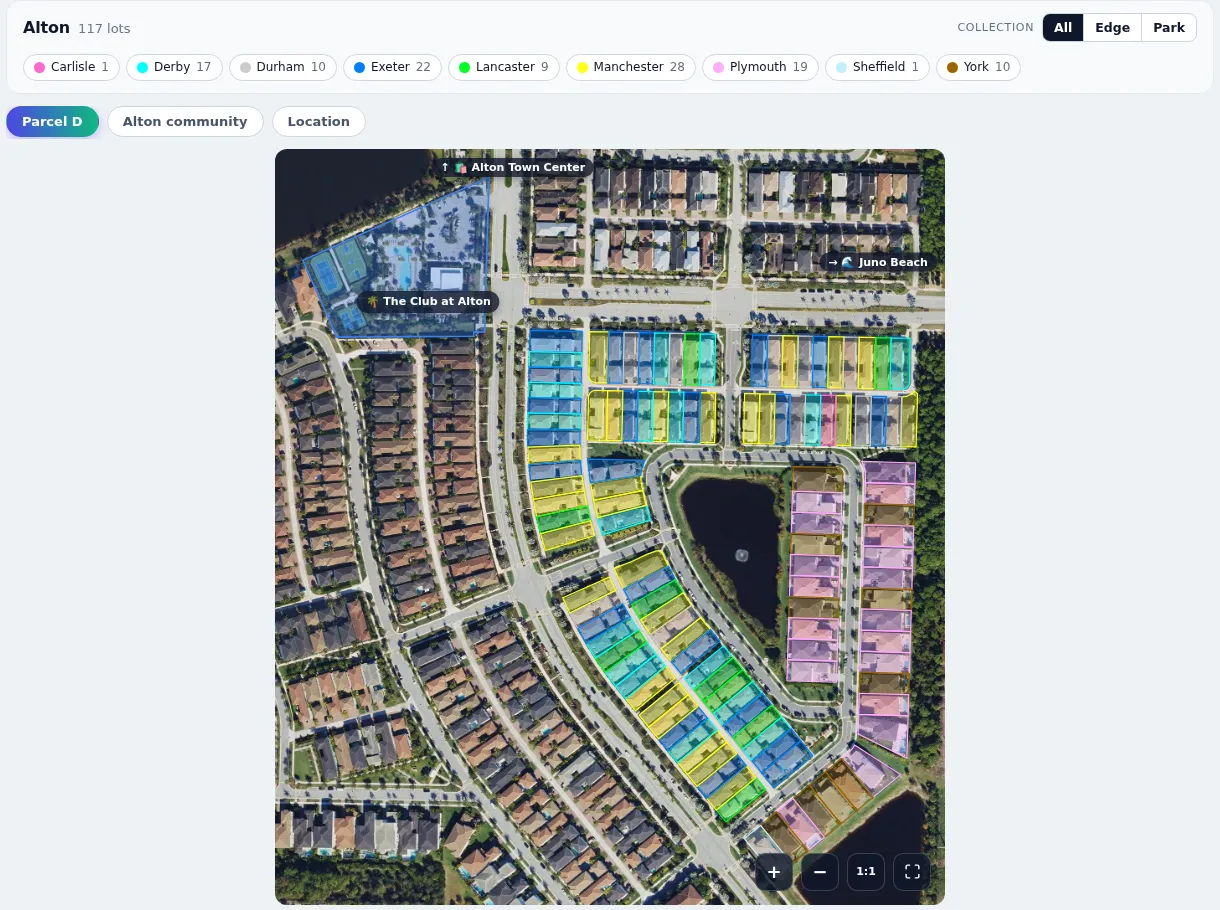 One neighborhood (117 homes) of the live Alton map we built for Alton Life Realty in Palm Beach Gardens, FL, colored by home model, with pins for the clubhouse and town center. The full map covers all 931 homes. Open the live map.
On the screen, the buyer sees:
- Lots colored by model or collection, with a key at the top showing how many of each there are.
- Filter buttons, so you can show only one collection, one home type or only available lots.
- Views or tabs, for example one neighborhood up close, the whole community, and the community’s location.
- Amenity pins for the clubhouse, pool, town center, parks and trails. Tapping a pin opens a short description and photos.
- Zoom and fullscreen, so the map fills a big display and you can move in on a single street.
Tapping a lot opens its panel: the model name, address or lot number, bedrooms, bathrooms, square footage, the model’s floor plan and photos, and an inquiry button.
A walk-through in the new home sales center
A large screen earns its place during the first conversation. A typical flow at the sales center table looks like this:
- Start with the whole community. The buyer sees every lot, the amenities and how much is already sold. That sets the scene faster than a verbal tour.
- Show the location. Switch to the location view to show where the community sits relative to main roads, schools and shopping, before you talk about individual lots.
- Narrow it down. Tap the filter for the collection they’re interested in, or only available lots. The rest of the community falls away.
- Open a lot. The panel shows the model, beds, baths and square footage, with the floor plan right there. No flipping through a binder of plans.
- Compare two lots. Go back to the map, open a lot on the next street or one closer to the pool, and talk through the difference.
- Show the amenities. Tap the clubhouse pin and show the photos while you explain what’s included.
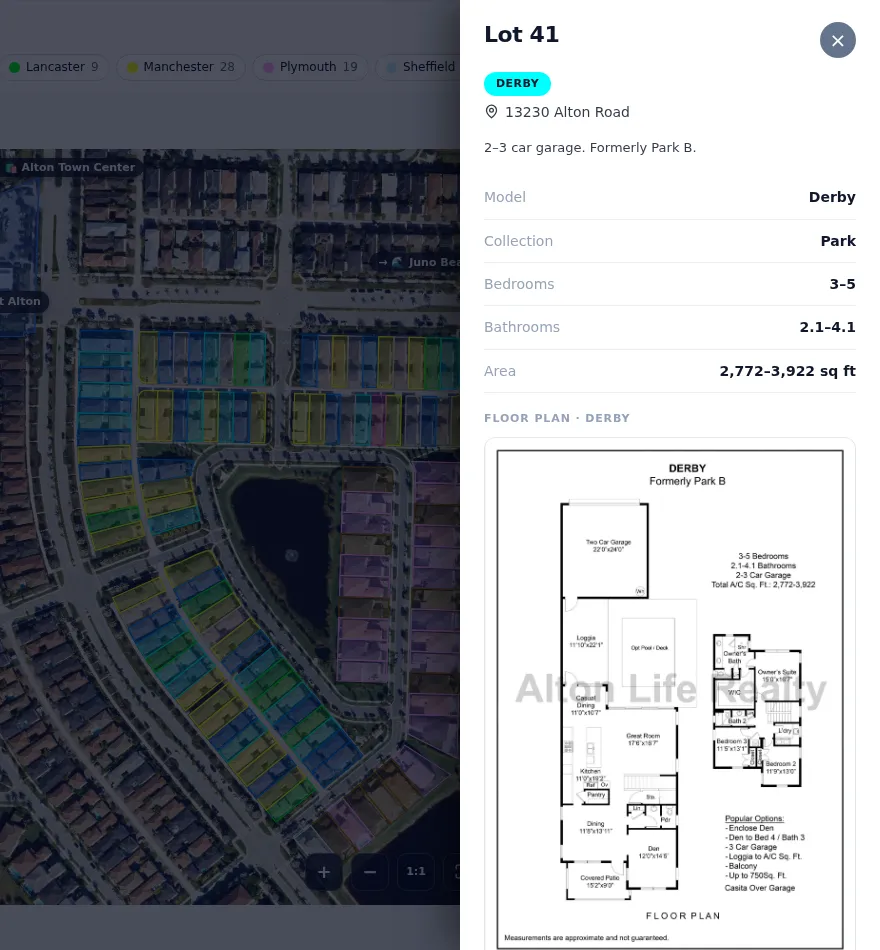 One home on the Alton map: model, address, bedrooms, bathrooms, size and floor plan.
The buyer also learns the map while you’re beside them, so it’s familiar when they open it later on their phone.
Which models fit which lots is a conversation of its own; we cover it in interactive lot maps for home builders.
Marking a lot Reserved on the spot
This is the part a board on the wall can’t do.
When a buyer decides and puts down a deposit, a member of your team opens the dashboard on their own phone or laptop and changes that lot to Reserved. The change shows straight away on the big screen in front of the buyer, on the other consultants’ tablets, on your website and on every link already sent to other buyers. The map itself takes no deposits or payments and doesn’t lock a lot: your team takes the deposit the usual way, and the map shows the status they set.
On a busy weekend or a phase release, two consultants can be talking about the same lot with two different families. With everyone looking at the live map, the second consultant sees the lot change and moves their buyer to another option before it turns into an awkward conversation.
It also gives the buyer a small, real moment: they watch the lot they just committed to change on the screen. When the home closes, the same lot moves to Sold.
Agree in advance who is allowed to change status, so two people aren’t updating the same lot. And keep the dashboard on staff devices, not on the buyer-facing screen.
Texting the buyer the same link
Most buyers don’t sign on the first visit. They go home, talk it over, check their budget and look again in the evening.
Instead of sending them home with a brochure, a printed plat and a price sheet that will be out of date within weeks, text them the link to the map before they leave, or send it by email or WhatsApp. They open it on their phone and see exactly what they saw in the sales center.
That does three things:
- They see live status. If the lot they were thinking about gets reserved, they see it change. Nobody has to tell them the community is selling.
- They can share it. A spouse, a parent helping with the down payment or a relative in another state can open the same link and look at the same lot.
- The inquiry names the lot. When they’re ready, they tap inquire on that lot, and your consultant knows exactly which conversation to pick up.
Realtors who bring buyers to your sales center can be sent the same link, so the material they forward to clients is current too. For agents who specialize in a community, see interactive community maps for real estate agents. For more ways to follow up and bring buyers to the sales center, see home builder marketing ideas.
Screens, tablets and what you need
You don’t need special hardware. The map is a web page, so it runs on equipment many sales centers already have:
| Setup | Good for | Notes |
|---|---|---|
| Large TV or monitor with a laptop or streaming device | Presenting to a couple or family at the table | Drive it from the laptop, or pair it with a tablet |
| Touchscreen display | Buyers browsing on their own while they wait | They tap lots directly, the same way as on a phone |
| Tablet | Consultants walking buyers to the model homes | Easy to hand to a buyer |
| Laptop | Off-site events and realtor open houses | Can connect to a larger screen |
What it does need is an internet connection. The map loads lot status live from the dashboard, which is the whole point, so put the screen on the sales center Wi-Fi and keep a mobile hotspot as a backup. There’s no dedicated kiosk mode and no offline mode; it’s a web page in a browser. The browser’s own full-screen option is usually all you need to make it look clean on a display.
Give the display its own browser profile, logged out of email and social accounts, and test the connection before a grand opening or phase release.
The plat on the wall vs a live site plan
| Printed plat or board | Interactive site plan on a screen | |
|---|---|---|
| Lot status | As current as the last update by hand | Live from the dashboard |
| Matches the website | Only if someone keeps both in sync | Same map, same data |
| Finding a lot | Point and read small numbers | Filter, zoom and tap |
| Model and floor plan | Separate binder or flyer | In the lot panel |
| Amenities | Icons on the drawing | Pins with photos |
| Reserving a lot | A sticker, added later | Marked Reserved, everyone sees it |
| After the visit | Brochure in a bag | Link on the buyer’s phone |
Keep the board if you like how it looks in the room. The screen replaces the parts that go out of date.
How to get one
The interactive site plan in your new home sales center is the same one you embed on your website, so there’s nothing extra to buy for the screen. FoudaTech builds it with Tower Maps as a done-for-you service.
- Send your site plan or aerial image of the community.
- Send the lot data: lot numbers, models, status, sizes and prices. A spreadsheet is fine.
- Send model information: floor plans and photos, plus photos of the amenities.
- We map every lot and pin and set up your dashboard.
- You get an embed and a link: one script tag for WordPress, Webflow or a custom site, and a link to open on the sales center screen and text to buyers.
The map system is already built and running, so your map can be live in 2–3 days once we have your site plan, lot list, floor plans and photos. Larger projects take longer, and we’ll tell you up front. Have those ready ahead of a grand opening or phase release.
Pricing is a setup fee plus an annual subscription (USD):
- Small community (one view, a few models): from $2,000 setup + $600/year
- Larger communities, several phases or neighborhoods, and builders with several communities: quoted from your site plan and lot list
The subscription covers hosting, the dashboard, updates, support and edits, so status, prices and new phases stay current on every screen. For the bigger picture on community maps, see interactive site plans for property developers.
Try the live demo on a tablet → or request a free demo of your community.
See It Live: Alton, Florida
The map on a sales-center screen is the same one buyers open on their phones. Here’s one live today. Alton, in Palm Beach Gardens, Florida, has 931 homes in four neighborhoods, built in 17 home models. We built its map for Alton Life Realty, a real estate team that focuses on Alton. Every home is outlined on aerial imagery and colored by its model, a key counts the homes of each model, and one tap shows a home’s address, model, bedrooms, bathrooms, square feet and floor plan.
The team saw a free demo of one neighborhood the day after their first email, and the full map went live on their own website nine days after that email. Open the live Alton map or read how we built it.
Related guides: interactive site plan software, subdivision plat maps.
Frequently Asked Questions
Do we need kiosk software for the sales center screen?
No. The map is a web page, so it runs in a normal browser on a TV, monitor, touchscreen, tablet or laptop. The browser’s full-screen mode is usually enough for a display. There is no dedicated kiosk mode.
Does it work without internet?
No. It needs an internet connection to load live lot status. Use the sales center Wi-Fi with a mobile hotspot as a backup, and test it before busy days.
Can a consultant mark a lot Reserved during the appointment?
Yes. A team member changes the lot to Reserved in the dashboard on their own device, and the change shows immediately on the sales center screen, the website and every shared link. The deposit itself is taken the usual way; the map takes no payments.
Is it the same map as the one on our website?
Yes. One map, one dashboard. The screen in the sales center, your website and the link you text buyers all show the same data.
Can we show amenities as well as lots?
Yes. The clubhouse, pool, town center, parks and trails can each have a pin. Tapping a pin opens a short description and photos.
Can we hide prices on the screen?
Yes. You can show prices or hide them across the whole map, and hidden prices are left out of the page entirely, not just covered up. Buyers still see the lot’s status, model and floor plan.