Table of Contents
- The 3D Floor Plan Assumption
- Interactive 2D vs 3D: Side by Side
- Where Full 3D Actually Earns Its Cost
- Why Interactive 2D Usually Wins the Unit Sale
- How to Choose (and How to Use Both)
- Frequently Asked Questions
The 3D Floor Plan Assumption
Ask most developers how they’ll show an off-plan tower online and the answer comes back fast: we need a 3D floor plan. A full 3D model, ideally a Matterport-style walkthrough, something that makes the building feel real before it exists. It sounds right. It’s also, for most projects, the expensive answer to the wrong question.
Here’s the thing a 3D floor plan does well: it impresses. It’s a marquee moment. What it does poorly is the actual job of an off-plan sales page — helping a buyer find which unit is available, what it costs, and how to inquire on it in a few taps, on a phone, without waiting for anything to load. That’s the gap the interactive 2D vs 3D decision really turns on, and it’s why we build lightweight interactive tower maps instead of heavy 3D models.
This post is a founder-to-founder comparison. Not “2D good, 3D bad” — 3D has a real place. But if your goal is selling units off-plan, the tool that wins is usually the fast, focused one, and it’s cheaper than you think.
What each one actually is
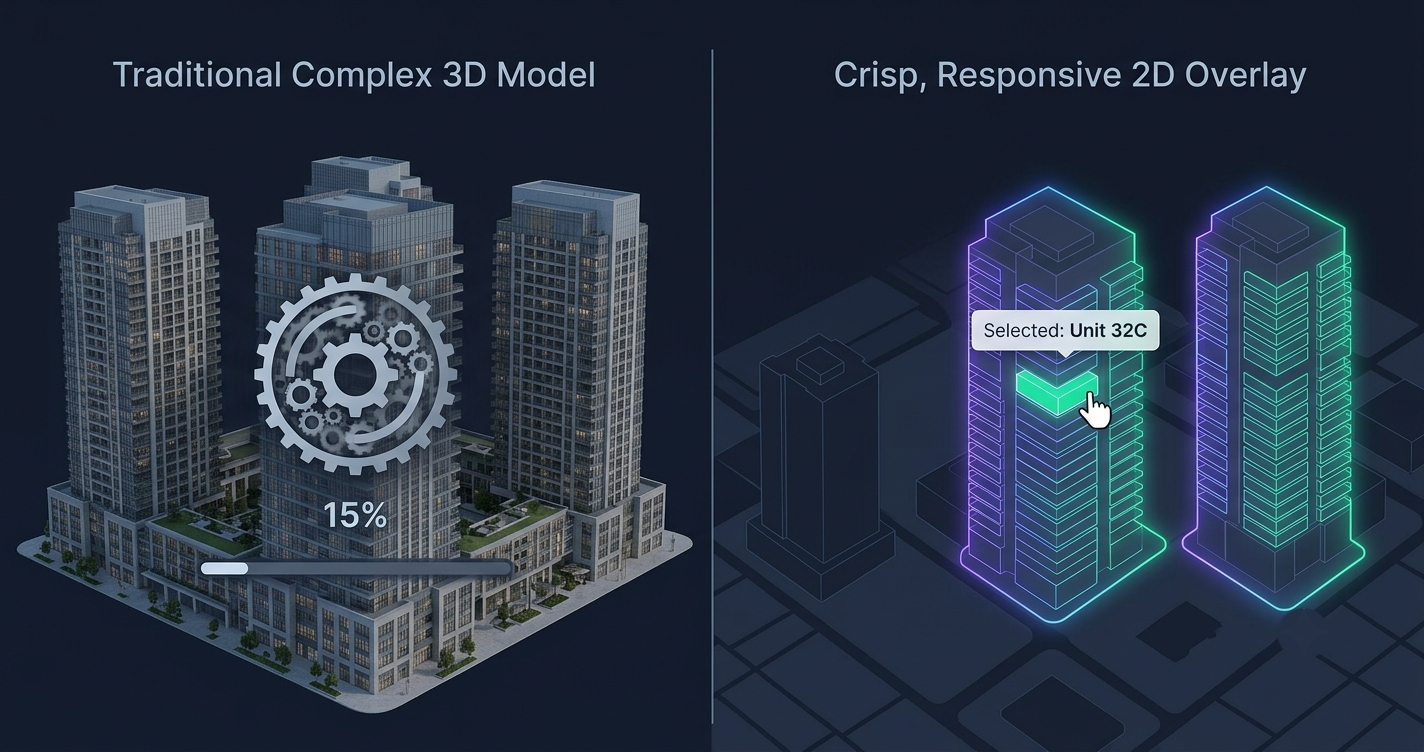
- An interactive 2D floor plan / tower map is a lightweight overlay: your existing tower render or floor plan with clickable SVG unit overlays on top. Tap a unit and it reveals price (or “on request”), floor, type, area, view, a gallery, a floor plan, and a live Available / Reserved / Sold status. It’s an image plus a smart, tappable layer — nothing to render.
- A full 3D floor plan is a built model: a rendered 3D scene, a fly-through, or a Matterport-style virtual tour. Beautiful, immersive, and heavy — it has to download and render a 3D asset before the buyer sees anything.
The difference in feel is real. So is the difference in cost, load speed, and how many units you actually sell.
Interactive 2D vs 3D: Side by Side
| Factor | Interactive 2D Overlay | Full 3D Model / Walkthrough |
|---|---|---|
| Cost to build | 🟢 Low (from ~$1,200 setup) | 🔴 High (often 5–10×+) |
| Build time | 🟢 ~2 weeks | 🔴 Weeks to months |
| Load speed | 🟢 Fast, lightweight | 🔴 Heavy asset to download/render |
| Mobile experience | 🟢 Tap-optimised, loads fast | ⚠️ Can stutter on mid-range phones |
| Unit selection + pricing | ✅ Core purpose | ⚠️ Often bolted on |
| Live availability | ✅ Dashboard, instant | ⚠️ Rarely built in |
| Conversion (unit inquiries) | 🟢 High — low friction | ⚠️ High engagement, more drop-off |
| Upkeep / edits | 🟢 Unlimited edits, instant | 🔴 Re-render to change anything |
| ”Wow” factor | ⚠️ Clean, not cinematic | ✅ Cinematic |
The pattern is clear: 3D wins on spectacle, 2D wins on the mechanics of actually closing a unit sale. For the full unit-selling argument, see interactive floor plans for real estate developers.
Where Full 3D Actually Earns Its Cost
Let’s be fair to 3D, because it deserves it. A full 3D model or virtual tour is the right call in specific situations:
- Hero and marquee moments. A cinematic fly-through of a flagship tower on your landing page is genuinely powerful. It sells the vision of the development.
- Ultra-premium single units. For a $5M penthouse where one buyer needs to feel the space before flying in, a Matterport-style walkthrough can justify itself on a single sale.
- Show-home experiences. When the interior finish is the product, immersive 3D lets a remote buyer walk the actual rooms.
- Award submissions and investor decks. Spectacle has value beyond direct sales.
If any of those describe your project, 3D isn’t waste — it’s a marquee layer. The mistake isn’t building 3D. The mistake is making a heavy 3D model the primary way buyers try to select and reserve units, because that’s where the cost and the friction quietly cost you sales.
Why Interactive 2D Usually Wins the Unit Sale
For the everyday job — a developer with a tower of 40, 100, 200 units to move off-plan — a fast interactive 2D map wins on the things that convert.
It loads fast, especially on mobile
Most property browsing happens on a phone. A lightweight 2D overlay is engineered to load fast on mobile because there’s no 3D scene to render — it’s your image plus a tappable layer. A heavy 3D walkthrough asks a buyer on a mid-range phone to wait, and every second of waiting is a buyer you lose. Industry research on web performance is blunt on this point: mobile conversion drops sharply as pages get slower to load. Speed isn’t a nice-to-have; it’s the sale.
It answers the three questions buyers actually have
Which units are available, what do they cost, and how do I inquire? A 2D tower map answers all three in one tap: live status Available / Reserved / Sold, per-unit price or “on request,” and a one-tap inquiry on a specific unit. Buyers filter to what they want and hand your sales team a qualified, warm lead instead of “I’m interested in your project.” That mechanism is the whole point of an interactive tower map — and it’s why a fast map beats a static PDF too, as we cover in interactive tower map vs floor plan.
It updates instantly, forever
Sold unit 12B this morning? Flip it in the live management dashboard and your site updates right away — no re-render, no developer, no waiting. A 3D model has to be re-rendered to change anything, which is why prices and availability on 3D showcases so often go stale. With our maps, edits are unlimited and included in the subscription.
It costs a fraction — and ships in about two weeks
A custom interactive 2D map starts around $1,200 setup + $600/yr (Starter), with Growth at $2,000 + $900/yr and Premium from $5,000 + $2,000/yr for larger portfolios. A comparable full 3D build is frequently several times that, before ongoing re-render costs. And because the 2D map is a done-for-you SaaS delivered as an embeddable widget — one script tag, custom-built and mapped to your render — standard delivery is about two weeks, not months.
How to Choose (and How to Use Both)
You don’t actually have to pick a side. The smart play for most developers is a fast interactive 2D map as the workhorse for unit selection and availability, with 3D reserved as a marquee layer where the budget and the moment justify it.
Choose a lightweight interactive 2D map as your primary tool when:
- You’re selling units in a multi-storey building off-plan
- A meaningful share of buyers are remote or diaspora and can’t visit
- You want live availability and instant price edits without a rebuild
- You need it live in weeks, not months, on a sensible budget
Layer in full 3D when you have a flagship hero moment, an ultra-premium unit, or a show-home experience that genuinely needs immersion — and let it drive traffic toward the 2D map where the actual reserving happens. If you’re comparing related tools, our pieces on the interactive building visualizer and adding an interactive floor plan to your website go deeper on the 2D approach.
The delivery model makes the choice low-risk: the map is a single embed that drops into WordPress, Webflow, or a custom site with no rebuild, on a setup fee plus annual subscription basis that includes hosting, the dashboard, support, and unlimited edits.
See a live interactive tower map → or request a free preview of your own building — no cost, no commitment.
Frequently Asked Questions
Do I really need a 3D floor plan to sell off-plan?
Usually no. A 3D floor plan is excellent for a hero or marquee moment, but for the actual job of helping buyers find and reserve a specific unit, a fast interactive 2D map converts better — it loads faster, works better on mobile, and shows live pricing and availability. Save 3D for flagship moments and ultra-premium units.
Isn’t a 2D map less impressive than a full 3D walkthrough?
It’s less cinematic, yes. But “impressive” and “converts” aren’t the same thing. A heavy 3D virtual tour wows, then often loses the buyer to load time and drop-off on the way to actually inquiring. A clean 2D map gets them to a specific available unit in a tap. Many developers use both: 3D to impress, 2D to sell.
Will an interactive 2D map slow down my website?
No — that’s a core reason to prefer it. It’s a lightweight overlay on your existing image, engineered to load fast on mobile, not a heavy 3D model or Matterport-style scene that has to download and render before anything appears.
Can I add 3D later if I start with the 2D map?
Yes. Start with the fast 2D tower map as your unit-selling workhorse, and add a 3D hero fly-through later as a marquee layer if a project justifies it. The 2D map is a single embed, so nothing about it blocks doing more down the line.
How much does an interactive 2D map cost versus 3D?
Interactive 2D maps start around $1,200 setup + $600/yr and scale to Premium from $5,000 + $2,000/yr. A full 3D build is typically several times that up front, plus re-render costs whenever prices or availability change. All figures in USD.
How do I get started?
You send your tower render and unit data; we custom-build the map to your building and deliver it as an embeddable widget plus a live dashboard, on a setup-fee-plus-annual-subscription basis, in about two weeks. Contact us to start with a free preview.