Table of Contents
- What Is an Interactive Masterplan?
- How the Navigation Model Works
- Multiple Tower Maps vs a Single Tower Map
- Why Large and Phased Projects Need One
- What a Multi-Tower Setup Includes
- How It Ties Into Your Per-Tower Maps
- How to Get One Built
- Frequently Asked Questions
What Is an Interactive Masterplan?
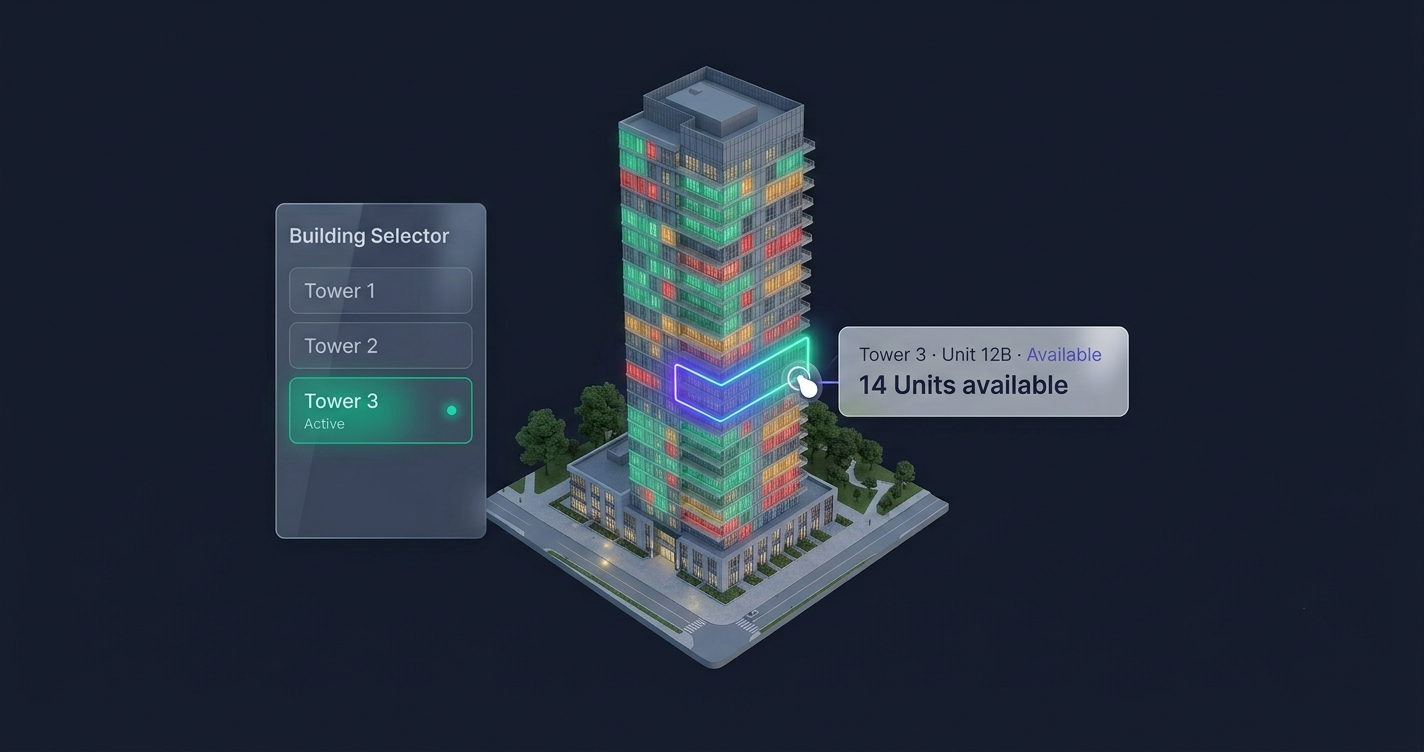
An interactive masterplan is a clickable sales experience for a development with more than one building. The practical, honest way to deliver it is to give each tower its own interactive map — every building fully explorable unit by unit — and tie them together with one management dashboard and a simple building selector, so a buyer can move from tower to tower and always see live availability and pricing.
If a single interactive tower map turns one building into a clickable unit explorer, a multi-tower setup does that for every building in your development. Each tower gets a dedicated map, mapped pixel-perfect to that building’s own render. Buyers self-navigate to the exact unit that fits them — without a brochure, a PDF, or a phone call.
You’ll also hear this called a masterplan application, an interactive site plan, a community plan, or a building selector. FoudaTech’s approach is deliberately clean: one dedicated map per tower, reachable from a lightweight building selector. There’s no single heavy aerial overlay to get lost in — each building is its own focused, fast-loading experience, and buyers pick the tower they care about first.
How the Navigation Model Works
The flow is a guided drill-down. Each layer answers one question, then hands the buyer to the next:
Level 1 — The building selector
A simple, on-brand selector lists your towers — “Tower 1, Tower 2, Tower 3,” or your real building names — with a quick summary for each: unit count, price range, and how many units are still available. The buyer picks the building they want. It’s a clean menu, not a maze.
Level 2 — The tower map
Selecting a building opens that tower’s interactive tower map. The buyer sees the building elevation with every unit overlaid and its live status. This is the same per-tower map you’d deploy for a single building — one dedicated map, focused on that one tower.
Level 3 — The unit
Clicking a unit opens a full panel: price (or “on request”), floor, type, area, view, gallery, and floor plan. From there the buyer inquires in one tap — a form plus WhatsApp or call — and your team receives a lead that already names the exact tower, floor, and unit.
The building selector stays within reach, so a buyer can move from Tower A back to the selector and open Tower B in a couple of taps to compare.
Multiple Tower Maps vs a Single Tower Map
Both are clickable and both show live availability. The difference is scale and structure:
| Single tower map | Multi-tower setup | |
|---|---|---|
| Scope | One building | Every building in the development |
| Navigation | Building → unit | Selector → tower → unit |
| Best for | One tower, one phase | Multi-tower, phased, or community projects |
| Building selector | Not needed | Included, to move between towers |
| Phased release | N/A | Launch each tower’s map as its phase goes live |
| FoudaTech tier | Starter / Growth | Premium |
A single tower map is perfect when you’re selling one building. But a multi-tower development needs a map for each tower — and a simple way for buyers to move between them without getting lost. That’s what the Premium setup gives you. We compare the building-level view in interactive site plans for property developers.
Why Large and Phased Projects Need One
For a multi-tower development or a staged community, a single map isn’t enough. Three reasons come up repeatedly:
- Buyers need orientation before detail. In a big project, the first question isn’t “which unit?” — it’s “which building, and which view?” The building selector answers that first, then hands the buyer into that tower’s map. Industry research consistently shows buyers engage far more with listings they can explore themselves than with static plans they have to decode.
- Phased releases stay controlled. With a phased release, you often want Phase 1 live and selling while Phase 2 is “coming soon” and Phase 3 is hidden. You control which towers appear in the selector and when — flip a building from teaser to live the day it launches, from the dashboard.
- Cross-tower comparison drives urgency. When a buyer can see that Tower A is nearly sold out while Tower B just opened, scarcity does the selling. Each tower’s map shows its own live availability, and the selector makes it quick to jump between them. We cover the sales mechanics in how real estate developers can increase pre-sales with technology.
For diaspora and remote buyers — someone in London evaluating a Dubai or Lagos development at midnight — these maps are the sales office. They have to carry the whole project on their own.
What a Multi-Tower Setup Includes
A production-grade multi-tower setup from FoudaTech is the Premium use case, and it includes:
- A dedicated interactive map for each tower — custom-built and mapped to that building’s own elevation
- A building selector — a clean, on-brand menu of your towers so buyers move between them easily
- Live availability throughout — Available / Reserved / Sold, updated in real time on every tower’s map
- Full per-unit detail — price or “on request,” floor, type, area, view, gallery, floor plan
- Phased-release controls — show, hide, or tease individual towers as they launch
- Smart filters — by floor, unit type, bedrooms, price, or “available only,” within each tower
- One-tap inquiry — a form plus direct WhatsApp and call buttons, per unit
- A single management dashboard — your team updates pricing, status, and phases across every tower themselves
- A lightweight, mobile-first build — each map loads fast on a phone; it’s not a heavy 3D model
- On-brand design — your colours, your currency (USD or local), optionally white-labelled
You decide what each unit reveals — some developers show every price, others use “on request” to keep buyers inquiring. Each tower’s map respects those choices building by building.
How It Ties Into Your Per-Tower Maps
A multi-tower setup isn’t a separate product from your tower maps — it is your tower maps, one per building, managed together. Each tower opens the same real-time unit availability map you’d deploy on its own, so nothing is duplicated and nothing falls out of sync.
That means one source of truth. When your sales team marks a unit Sold in the dashboard, it updates on that tower’s map and in the selector’s building-level availability count at the same time. No spreadsheets, no stale PDFs, no “let me check and call you back.”
Delivery is an embeddable widget — a script tag that drops into your existing site on WordPress, Webflow, or a custom build, with no rebuild. Several towers is more to design and map than a single building, so it’s the tier where the extra depth earns its keep.
Explore FoudaTech Interactive Tower Maps → or request a free preview of your development.
How to Get One Built
The process mirrors a single tower map, with more moving parts:
- Send your assets — each tower’s render or elevation, your building names, and your unit data (a spreadsheet is fine).
- We build and map it — a dedicated interactive map for every tower, mapped pixel-perfect to your renders, plus the building selector that ties them together.
- You get the embed and dashboard — the code to go live, plus one dashboard to manage pricing, availability, and phased releases across every tower.
Standard delivery is around two weeks; larger multi-tower projects can be expedited when a launch date is fixed. Pricing is a one-time setup fee plus an annual subscription — the subscription covers hosting and uptime, the management dashboard, updates and support, and unlimited edits. The Premium tier (from $5,000 setup + $2,000/year) is built for exactly this multi-tower, phased scale.
Talk to FoudaTech about your development →
Frequently Asked Questions
What’s the difference between a multi-tower setup and a single tower map?
A single tower map covers one building — buyers click a unit to see its details. A multi-tower setup gives each building its own dedicated map and adds a building selector on top, so buyers pick a tower first, then drill into that tower’s map, then a unit. A single building only needs one map; a multi-tower or community project needs a map per tower.
Can I launch buildings in phases?
Yes. Phased-release controls let you keep Phase 1 live and selling while later towers show as “coming soon” or stay hidden in the selector entirely. You flip a tower live from the dashboard the day it launches — no developer needed, no code changes.
Does it work for a community, not just towers?
Yes. Each building — high-rise tower, low-rise block, or a villa cluster — gets its own dedicated interactive map, and the building selector lets buyers move between them. Every building is a focused experience rather than one crowded overview.
How does availability stay in sync across every tower?
There’s one source of truth: your management dashboard. When a unit changes to Reserved or Sold, it updates on that tower’s map and in the selector’s building-level availability at the same moment — in real time, everywhere it appears.
Is a multi-tower setup slow to load?
No. Each tower is a lightweight, mobile-first map layered on your existing 2D render — it loads fast on a phone and isn’t a heavy 3D model. Buyers only load the tower they open, so nothing bogs down even on a large development.
How much does a multi-tower setup cost?
It’s the Premium use case: a one-time setup fee plus an annual subscription, in USD. Premium starts from $5,000 setup + $2,000/year and is built for multi-tower and phased developments. The subscription covers hosting, the dashboard, updates, support, and unlimited edits. Contact us for an estimate based on your project.